Password
Increased security through managing login attempts and timeframes as well as password usage control is available.
This guide identifies the parameter numbers and names required for completion to enable this security feature. A separate Parameters guide provides a list of all parameter numbers and names, some information on the role of the parameter and steps on how to edit them.
Account Locking and Password Security
Parameter driven, security functionality includes the ability to temporarily lock accounts when the established number attempts to login within an established timeframe have occurred.
Staff can establish a minimum password length and set whether it is to be generated automatically. Other options include determining whether a password must be changed and, if so, how many days before a new one must be created, the structure of the password and if a previous password can be reused, how many other new passwords must be used in the interim.
Related Parameters
Parameters are accessed via Management > Parameters > Circulation > Passwords and Account Locking.
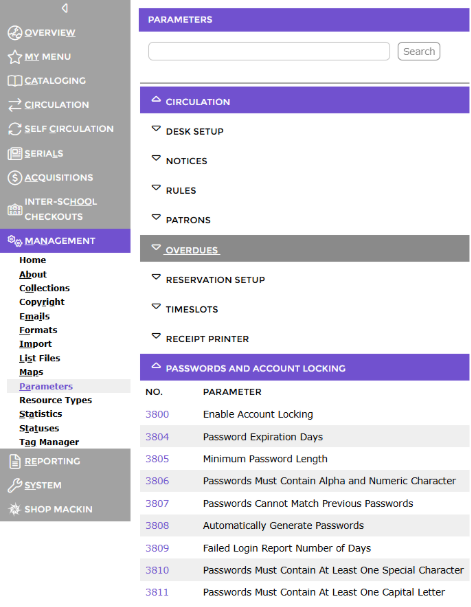
Parameter No. 3800 – Enable Account Locking
Parameter No. 3801 – Account Lock Threshold
Parameter No. 3802 – Account Lock Counter Duration
Parameter No. 3803 – Account Lock the Duration
Parameter No. 3804 – Password Expiration Days
Parameter No. 3805 – Minimum Password Length
Parameter No. 3806 – Passwords Must Contain Alpha and Numeric Character
Parameter No. 3807 – Passwords Cannot Match Previous Passwords
Parameter No. 3808 – Automatically Generate Passwords
Parameter No. 3809 - Failed Login Report Number of Days
Parameter No. 3810 – Passwords must Contain at Least One Special Character
Parameter No. – 3811 - Passwords must Contain at Least One Capital Letter
TIP:
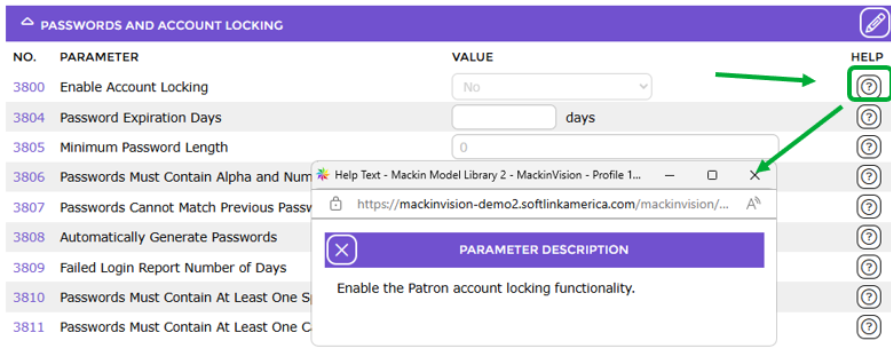
In the Parameters screen, each parameter number includes a corresponding Question Mark icon which, when clicked, displays a pop-up help text screen with information to assist staff with completing the parameter to conform to the library’s policies.
Was this article helpful?
That’s Great!
Thank you for your feedback
Sorry! We couldn't be helpful
Thank you for your feedback
Feedback sent
We appreciate your effort and will try to fix the article