Summary
List Files provide options to ensure consistency in the use of certain terms or codes specific to your library. Some of the List File types such as Departments or Ethnicity will not have files already established while others such as Component Types and Patron Types are provided with system default settings that should not be changed.
There are also 35 Custom List Files. These can be used by libraries to establish customized lists, for example terms specific to the organization, that are to be consistently used on your records. This guide provides the steps required to add a term in a List File. For further information on list files please see the Overview of List Files guide.
Create a New List File Entry Example
The following example show the process required to add a term to the Ethnicity List File. The process to create most List File terms is completed in the same manner.
- Navigate to Management > List Files and click on Ethnicity.
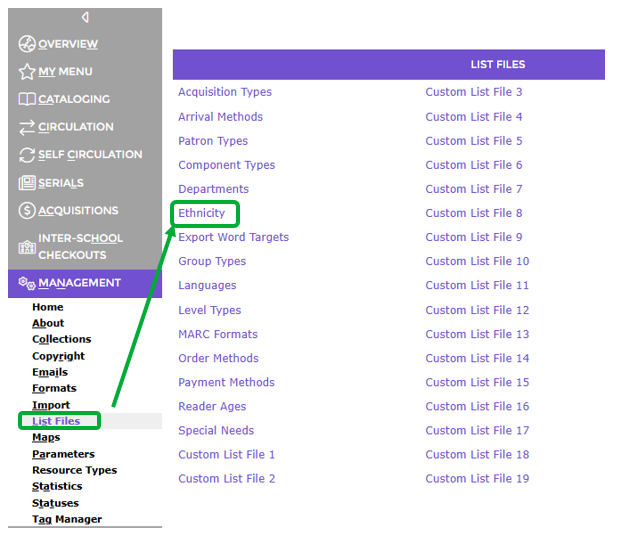
- The Ethnicity List screen will display.
- In the field next to the Add button enter the new Ethnicity term, for example, Spanish then click the Add button.

- If other terms already exist, the newly added term will display in the List screen in alphabetical order.
- The term will then be available for selection, from the Ethnicity field’s drop down list, on the Patron Add or Edit screen.
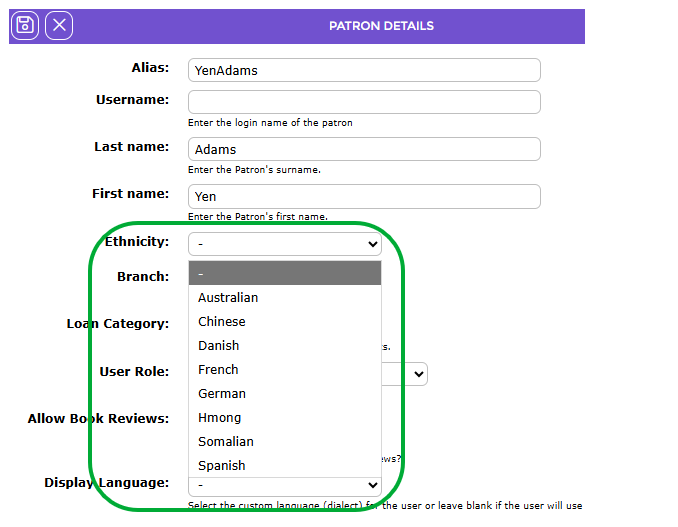
If the Ethnicity field (or Language or Special Needs etc.) is not available on the Patron Add/Edit screens, and you want to include such information on your patron records, use the Pages option located under System to add the field to both screens.
Was this article helpful?
That’s Great!
Thank you for your feedback
Sorry! We couldn't be helpful
Thank you for your feedback
Feedback sent
We appreciate your effort and will try to fix the article