Summary
If the library charges overdue fines, the amount is calculated based on whether a charge is applied only for the days that the library is open, or if a grace period applies, after that period has passed, or a combination of both or a charge applies for every day the checkouts are overdue. A maximum charge amount per item can also be set so that irrespective of how overdue an item becomes there is a limit to the amount that will accrue on that item.
This guide identifies the elements that affect how fines/charges are applied.
Parameter
Parameter No. 3404 – Overdue Days Include Closed Days. This parameter requires and Yes/No response. The option chosen will determine whether the entire duration, since the end of the grace period (if one applies), attracts a fine/charge. The default option is No, meaning that fines/charges are not calculated for closed days. The parameter can be changed if required.
Closed Days
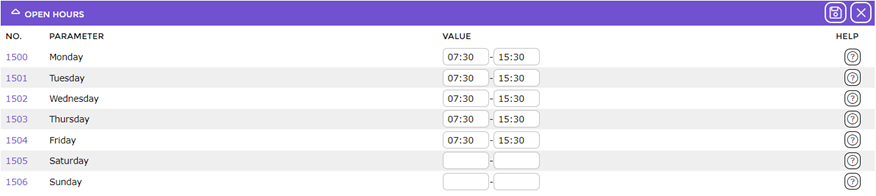
Library closed days, if applicable are set on either:
Parameter Nos. 1500 – 1506. There is one parameter per day of the week. If all branches in the system operate with the same opening and closing hours and days these parameters should be completed.
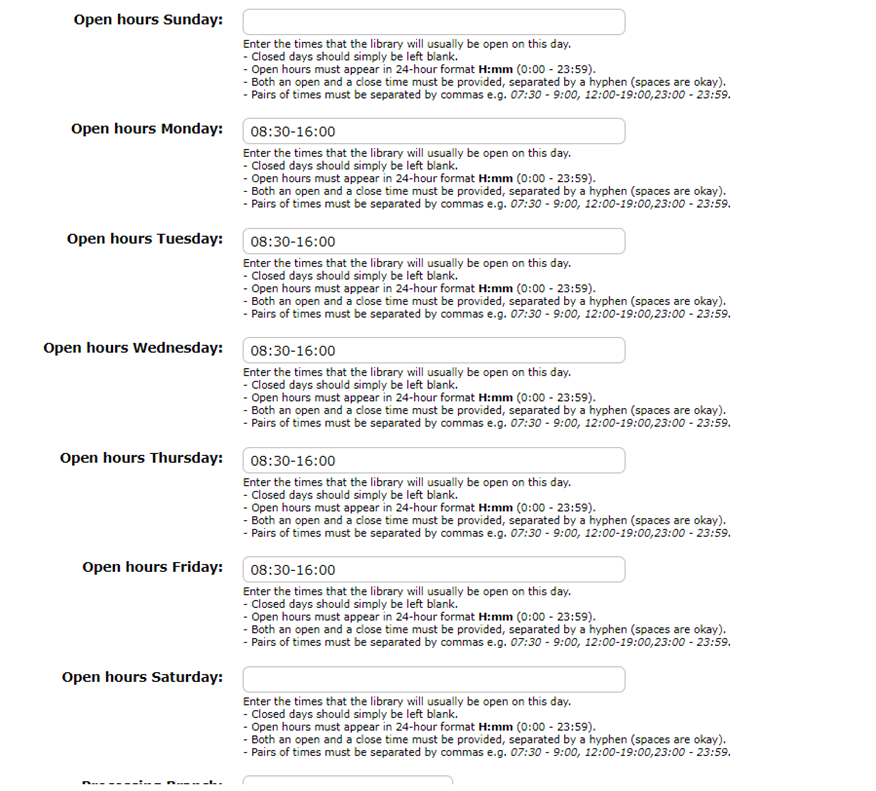
If each branch operates with different opening hours and/or closed days they should be entered for each branch via the System > Branches option.
Grace Period Setting
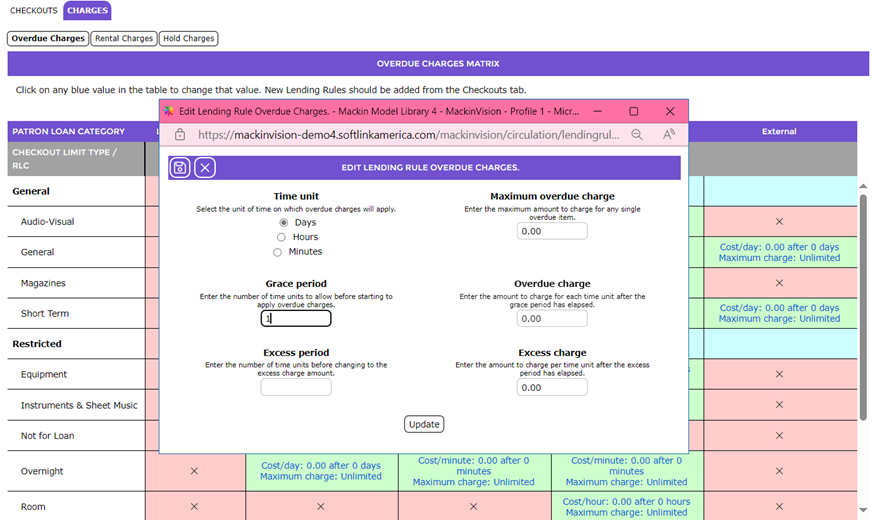
The Grace Period field is included in the screen that displays when a green cell, corresponding to the Patron Loan Category and the Resource Loan Category in the Charges tab, is clicked.
Field |
Description |
Time Unit | The Time unit field determines how often the overdue charges are incremented. To apply overdue charges per day click in the radio button next to Days, to charge per hour click in the radio button next to Hours, to charge per minute click in the radio button next to Minutes.
|
Grace period | The Grace period is the amount of time (in days, hours or minutes as specified by the Time Unit field) each overdue title will have before overdue charges are applied. Charges are not applied until the Grace period has expired. For example, if an overdue is charged at $1 per day with a Grace period of one day, and the title is returned on the second day, then a charge of $1 will be applied.
|
Excess Period | The Excess period is the amount of time (in days, hours or minutes as specified by the Time Unit field) before a new, presumably higher, rate is charged for the subsequent overdue days if the option applies. If it does not leave the field blank
The new rate is not applied to the initial period of overdue days leading up to the Excess period.
|
Maximum overdue charge | The Maximum overdue charge determines the amount that each individual overdue charge will be capped at. Leaving this field set to zero will not impose a limit.
|
Overdue charge | The Overdue charge is the amount that is applied for each Time unit that the title is overdue.
|
Excess charge | The Excess charge is the new amount to charge for each Time unit beyond the Excess period.
|
If there is a Grace period and the parameter is set to No then both the grace period and the library closed days are not included when calculating overdue fines/charges.
If there is no grace period, and the parameter is set to Yes, then fines/charges are applied to every day the checkout is overdue.
The above screen also provide for the setting of a maximum overdue charge. Once the maximum is reached the system will not apply any further charge amount per single item. There is no Excess period and Excess charge included in the above screen example.
Based on a Grace period of 1 day as seen in the above example and No being selected on Parameter No. 3404 the following is an example of how the system calculates the charges payable for the first six days each item is overdue:
- Day 1: $0.00 – charges not calculated during the Grace period
- Day 2: $1.00 – the Grace period has expired and the daily rate of $1.00 is applied
- Day 3: $2.00
- Day 4: $3.00
- Day 5: $4.00
- Day 6: $5.00
- Day 7 and any further overdue days: $5.00 per single item.
As a maximum charge of $5.00 is set in the Maximum overdue charge field as seen in the above screen example no further amount is charged per item irrespective of whether each item is overdue by more than 6 days.
Was this article helpful?
That’s Great!
Thank you for your feedback
Sorry! We couldn't be helpful
Thank you for your feedback
Feedback sent
We appreciate your effort and will try to fix the article