Patron Image file requirements
File name
The patron image files need a name that can link the image to the correct Patron. MackinVision will read and match files with the Patrons’ Alias, Student Code or Username as the file name (e.g., A jpg image for a Patron with an alias of B10001 is named B10001.jpg). Similarly, the Student Code or Username can be used. Valid file formats for Patron images are jpg, gif, and png.
File size
The Patron image default size is 144 (width) x 192 (height) pixels. Images that are larger or smaller than the default pixel size are scaled to fit. Large file sizes can slow down the performance of the Circulation Desk. If Patron records are taking too long to appear it may be necessary to reduce the size of the images. If possible, images larger than 50,000 bytes (48.828 kb) should be avoided.
Compressed (zipped) folder
The Patron image files must be compressed (zipped) into a single zipped folder. The zipped file containing the Patron images must not contain any folders, only Patron images.
Import a File of Patron Images
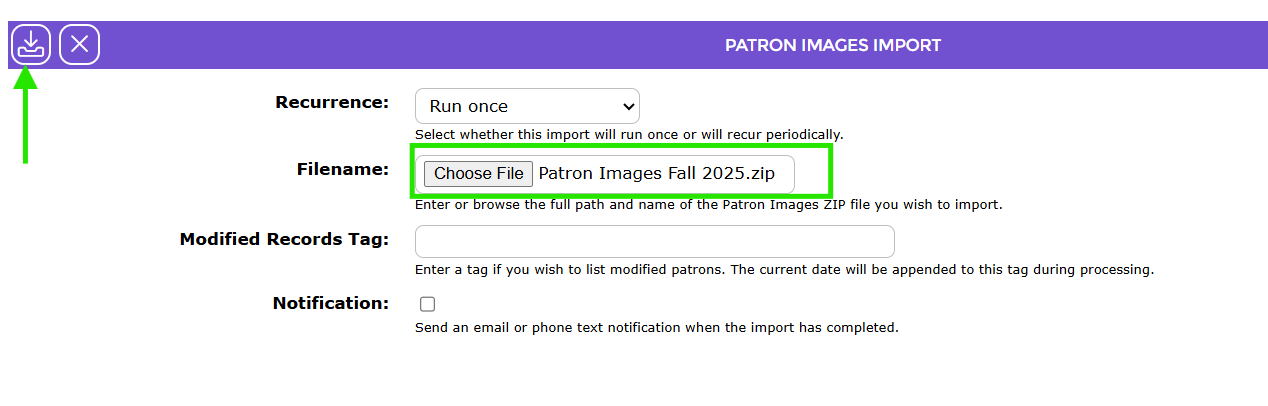
- Navigate to Management > Import and select Patron Images.
- Check that the Recurrence is set to Run Once.
- Choose the zipped file containing the photos.
- Select Import.
Was this article helpful?
That’s Great!
Thank you for your feedback
Sorry! We couldn't be helpful
Thank you for your feedback
Feedback sent
We appreciate your effort and will try to fix the article