This guide will provide an overview of the options for removing Resource and Copy records for items that are no longer in your library collection.
Summary
Weeding is the process of removing Copy and Resource records from the catalog. This may be required for a variety of reasons, for example, an item may:
- Have been lost, damaged or destroyed
- Be out of date or no longer relevant to your patrons
Weeded Container
Weeding does not completely remove the records. It moves the Copy and Resource records from the library catalog into a separate Weeded container that behaves like a recycle bin.
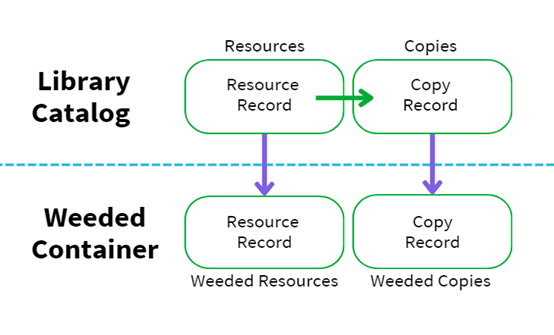
Records in the Weeded Container do not display in the OPAC or any other Search or Catalog interfaces in MackinVision.
Restore Weeded Records
Copies and Resources in the Weeded area can be restored to the library catalog but only one at a time. If both the Resource and Copy have been weeded, the Resource record must be restored first. 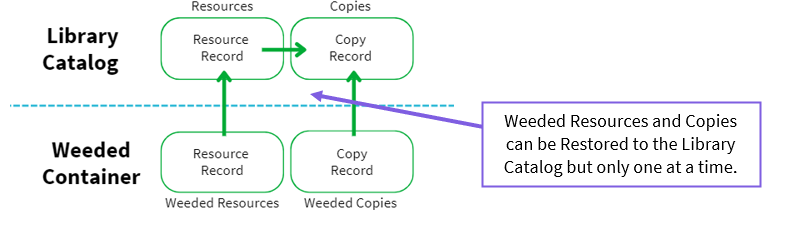
Purge Weeded Records
When Weeded records are no longer required, it is possible to purge them from the Weeded container. Purging permanently deletes the Weeded Resources and Copy records and they are no longer available.
The checkout history will no longer have a clickable link to a copy or resource that has been purged.
Note: If needed, run Reports on Weeded Copies and Resources before Purging. Once Purged the Copy Record and Resource Record no longer exist.
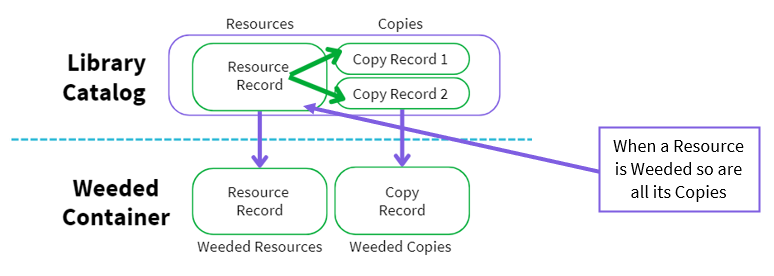
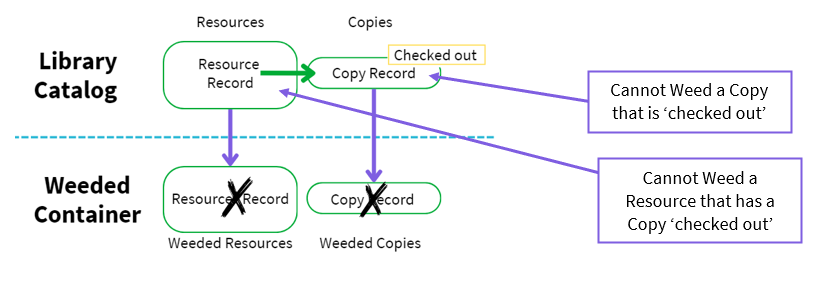
Weeding a Resource weeds all its Copies
When a Resource record is weeded, all Copies associated with that Resource are also weeded.
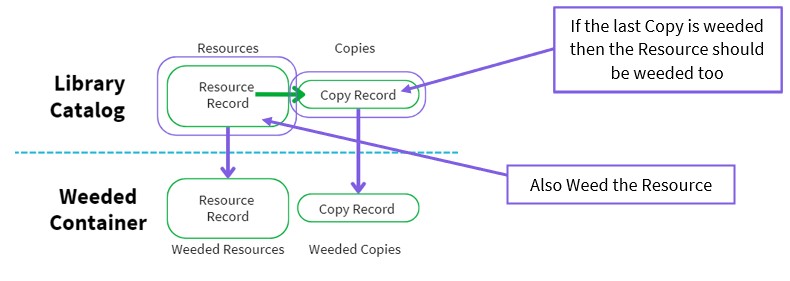
Weeding the last Copy of a Resource
When the last Copy that is associated with a Resource is weeded you will also be prompted to weed the Resource record.
Cannot Weed a Copy that is ‘On Checkout’
A Copy cannot be weeded if it is on checkout and a Resource cannot be weeded if any of its Copies also cannot be weeded.
Weeding in Bulk
Copies and Resources can be weeded individually or in bulk.
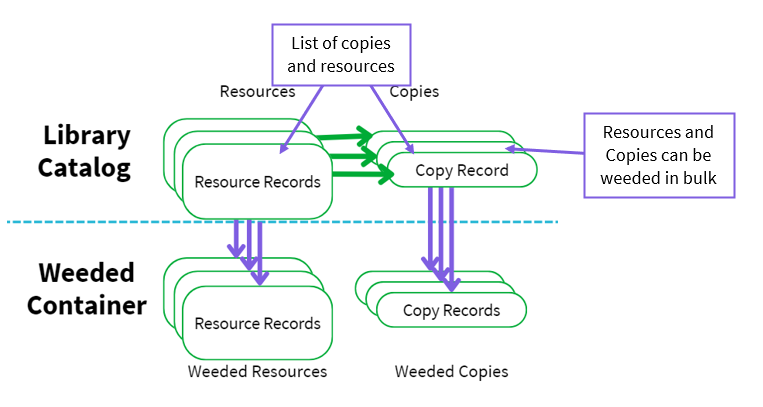
Weeding in bulk has a limit determined by parameters 2001 and 2107 to prevent accidental weeding of a very large number of records.
Related How To guides for Overview of Weeding
Copies
- How to Weed (Delete) a Single Copy
- How to Weed (Delete) Copies in Bulk
- How to Purge a Weeded Copy
- How to Complete a Purge All on Weeded Copies
- How to Run a Report on Weeded (Deleted) Copies
- How to Restore a Weeded Copy Record
Resources
Was this article helpful?
That’s Great!
Thank you for your feedback
Sorry! We couldn't be helpful
Thank you for your feedback
Feedback sent
We appreciate your effort and will try to fix the article