Summary
Each patron is assigned a Patron Loan category (PLC) which is used in Circulation Desk to determine each patron’s lending rules. These include which resources can be lent, the duration, and number of loans.
Patron Loan Categories are maintained in Circulation > Patron Loan Categories.
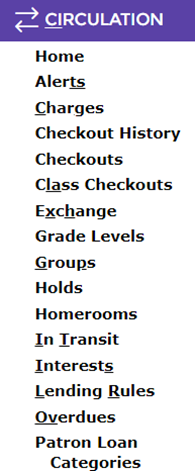
Select Patron Loan Categories from the Circulation menu
OR
Press the keyboard shortcut PLC (as indicated by the underlined characters in the Circulation menu)
Selecting a Patron Type is a mandatory requirement when creating a new Patron record. While there are four default Patron Types provided by the system, additional types can be created by authorized library staff as required.
This guide provides an overview of the role of Patron Types. Separate guides provide the steps required to add a Patron Type, changing a Patron Type, and establishing Lending Rules.
Patron Types
As part of the process to create a new Patron, the selection of a Patron Type is a mandatory requirement. This is because the Patron Type determines which fields are available for completion on Patron records. The types are located in the List File sub-menu option of the Management main menu option.
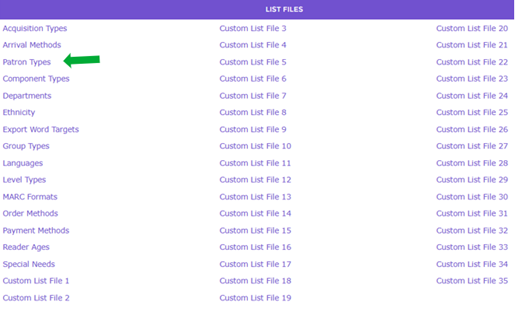
There are four system provided types from which to select. They are:
- External – this type is used for individual patrons who are outside of the organization
- Institution - this type is used for organizational patrons that are external to your organization, for example, schools and other educational facilities, government departments, local businesses and community groups that use the library
- Student – this type would be used for students if the library is part of an educational facility
- Staff - this type is used for internal staff members.
TIP: If your library includes a variety of different Staff member types, for example library staff, administration staff or teaching staff, and different lending rules apply to each, the same Patron Type of Staff can be used but a different Patron Loan Category (PLC) should be created for selection on the Patron record. This will accommodate any possible difference in the lending rules that would apply. It reduces the need to create many different Staff Patron Types, as well as the need to create a significant number of PLCs that would have to be done. In any case, to cater for differing lending rules, see the guide of setting up Lending Rules for further information.
|
It is not necessary to use all four default Patron Types. Some libraries may only require the use of one or two of the system provided types. If the reason for creating additional types is to differentiate the library’s variety of patrons (i.e. elementary students and secondary students) another option could be to create a Patron Lending Category (PLC) to which different lending rules would be set.
The Patron Types option is one way to define groups of patrons and can assist with the demographic and statistical information that may be necessary to determine usage and collection development requirements. As well as PLCs, (a mandatory requirement on Patron records), other List Files such as Departments, Ethnicity, and Languages for example, can be created and then selected on patron records to provide a more granular repository of information on your membership demographic.
Note: Public libraries may require more Patron Types than corporate or educational libraries. Required patron types could include Adult, Young Adult, Junior, Housebound, Institutional, and Organizational.
It is not advisable to set any library (custom) created types as the Default for Process. While a Process must be selected when creating any new types, setting them as the default is not recommended unless one of the system set defaults is not required by the library.
Selecting a Patron Type is one of the first steps to complete when creating new Patron records.
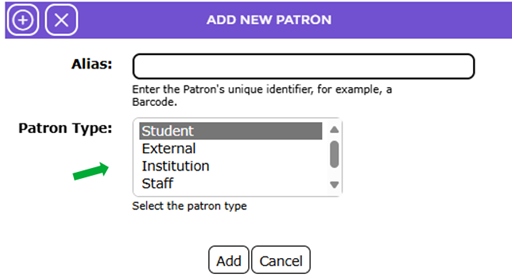
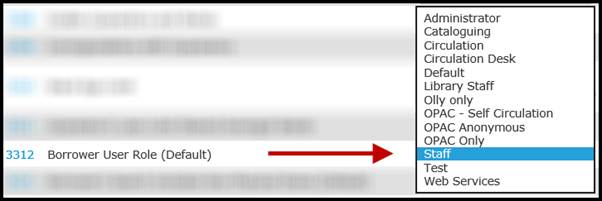
TIP: Authorized staff can select from the options on Parameter No. 3312 – Patron User Role (Default) to establish what Patron Type is highlighted by default on entry to the Add New Patron screen. Select the most common patron type, for example, if the most common patron being created is Adult, or Staff, select that option. This means that for the majority of times, when your library staff are creating new patron records, there is one less step they will need to take.
|
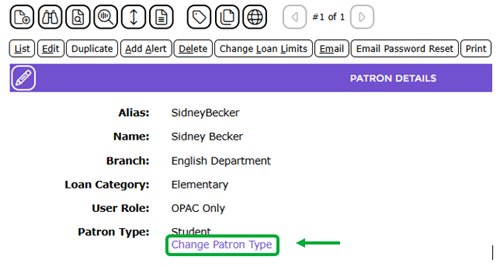
Changing a Patron Type is done by clicking on the change Patron Type link on the Patron Details screen. Other changes to patron details are done after clicking the Edit (Pencil) icon.
Was this article helpful?
That’s Great!
Thank you for your feedback
Sorry! We couldn't be helpful
Thank you for your feedback
Feedback sent
We appreciate your effort and will try to fix the article