Summary
Establishing Lending Rules that conform to the library’s policies requires the completion of four elements that make up the Lending Rules Matrix. The elements are created, maintained and edited as required via the Lending Rules sub-menu option of Circulation accessed from the Management screen.
This Overview guide provides an explanation of the Lending Rules matrix and the elements which make up the matrix. A separate guide provides information on how to create the elements of Resource Loan Categories (RLCs), Patron Loan Categories (PLCs), Checkout Limit Types (CLTs) and Circulation Expiration Dates (CEDs).
There is no limit to the number of PLCs you can create. This enables you to set up lending rules for many different types of patrons. For example, your library may have cooperative policies in place to checkout or share material with external users from people living in neighboring councils, educational organizations, business or governmental department libraries. Charges are also established via the Lending Rules Matrix Charges tab. A separate guide provides the information and the steps required to add charges.
Parameters
There are several parameters against which some default Lending Rules values can be set:
Parameter No. 2100 – Resource Loan Category (Default)
Parameter No. 3200 - Checkout Duration (Default)
Parameter No. 3201 - Hold Duration (Default)
Parameter No. 3202 - Recall Checkout Duration (Default), if you wish to recall checkouts
Parameter No. 3204 - Overnight Checkout Grace Period, if you have overnight checkouts
Parameter No. 3208 – Resource Box Contents Count Towards the Checkout Limit
Parameter No. 3211 – Return Items by closing time (days only)
Parameter No. 3300 – Patron Loan Category (Default)
See the Parameters guide for further information on the above-related parameters.
Overview
Click on the Lending Rules option under Circulation on the Management Home screen.
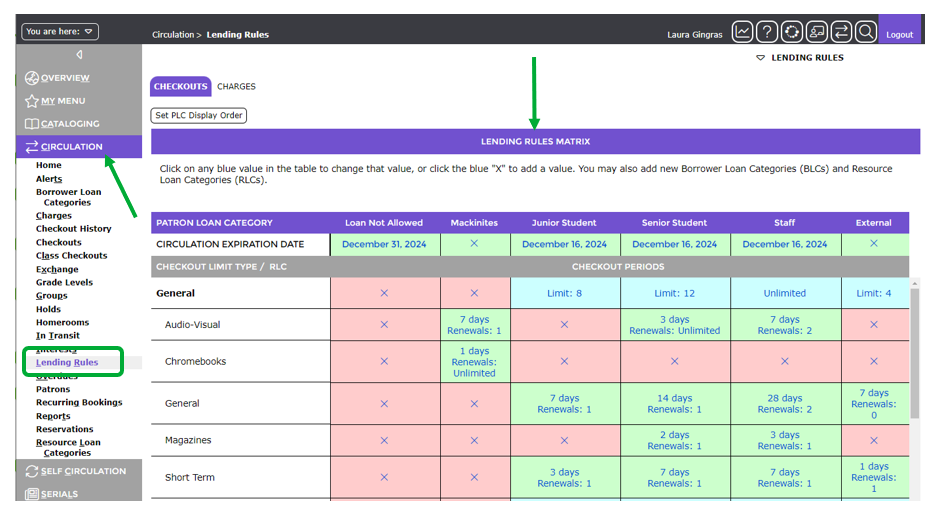
The Lending Rules Matrix will display. The cells in the matrix are color coded:
- White – white cells denote a heading. These cells contain the Resource Loan Category (RLC) or a Patron Loan Category (PLC)
- Blue – blue cells denote a Checkout Limit Type (CLT) name and a checkout limit for the relevant PLC
- Green – green cells denote RLCs corresponding to a PLC tied to Patrons who can check out copies with the RLC. Green also denotes a Circulation Expiration Date (CED) that has not expired.
- Pink – pink cells contain an ‘X’ indicating the applicable RLC is denied to the relevant PLC (or an RLC that has not been set with lending rules). Pink cells with a bold date indicate that the CED has expired.
Red text, or an ‘X’ in any of the cells in the matrix screen, are clickable links. Checkout rules already established will be in red text in cells with a green background. Any cells with no limit or specified checkout period established for specific BLCs will display an ‘X’ in a pink background.
The screen example below is of the Lending Rules matrix in which all required elements have been established. Several Patron Loan Categories with applicable Circulation Expiration Dates and Resource Loan Categories have been created with Checkout Limit Types and Checkout Periods established. There may be checkout limits and checkout periods that are not set. The pink cells in the Matrix screen indicate checkout limits and periods not yet set.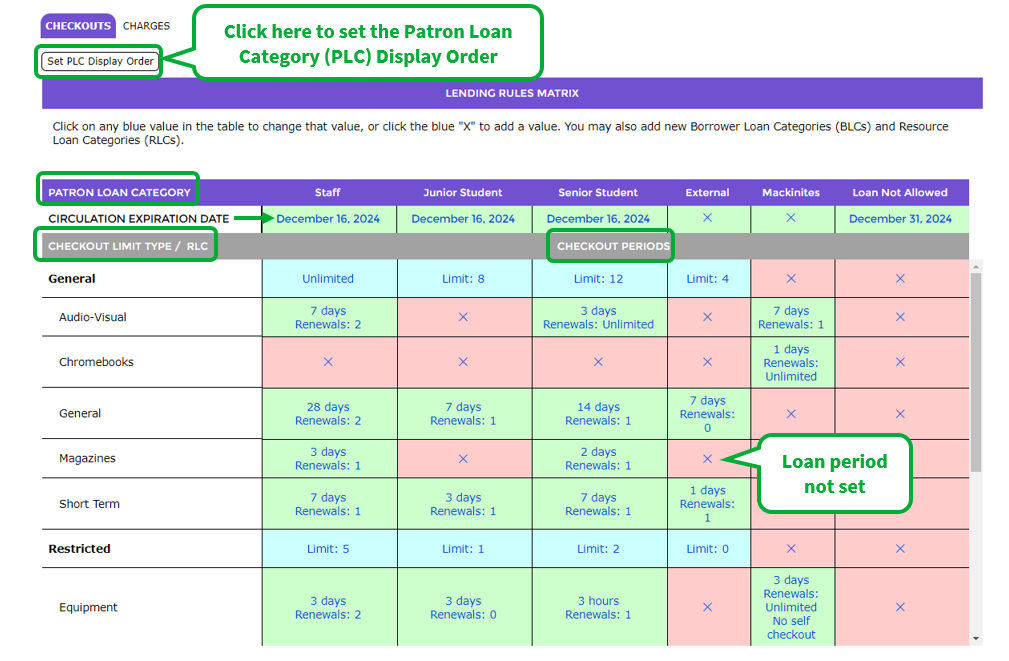
Elements That Make up the Matrix
- Patron Loan Categories (PLCs) – There are four system-provided PLCs. As many or as few additional categories can be created as required. The order in which the PLCs are displayed can be changed by clicking the Set PLC Display Order button on the matrix screen. Selecting a PLC in the Checkout Category field on a Patron record is a mandatory requirement.
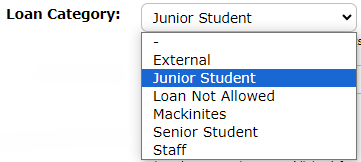
- A Circulation Expiration Date (CED) – This is the date set on each PLC. If there is no CED on a PLC, any patrons with that PLC may not be able to checkout items.
- Resource Loan Categories (RLCs) – As many or as few should be created as required, for example e-Books, General and Reports. RLCs should be selected on each copy record.
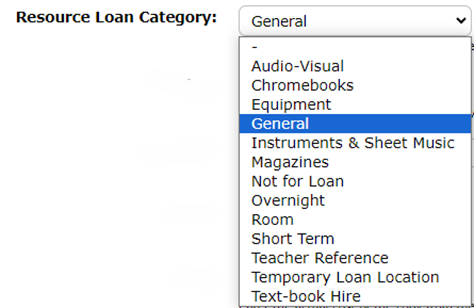
- Checkout Limit Types (CLTs) – create as many CLTs as required, for example, e-resources, General and Reports. This element determines how many copies with an associated RLC can be loaned, the checkout period and how many renewals are allowed for the corresponding PLC.
Using the Matrix to Identify Lending Rules for a Patron Type
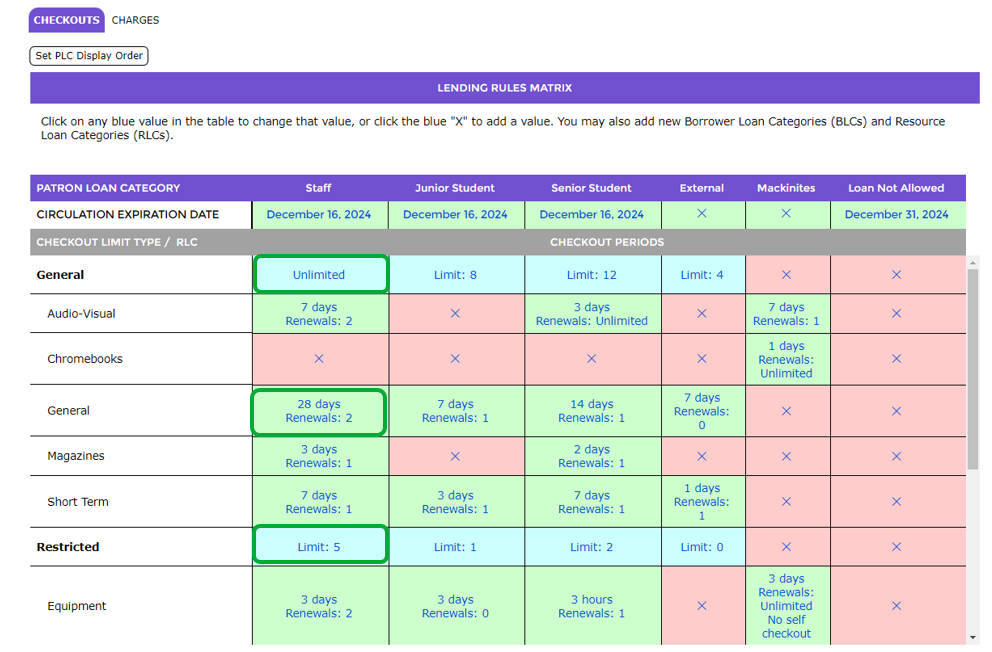
In the matrix screen provided below, you can identify that patrons with the PLC of Staff selected on their record will:
- Have a Circulation Expiration Date of December 16, 2024
- Can be loaned 5 items with the RLC of Equipment, which is grouped under the CLT of Restricted, and Unlimited items with the RLC of General which is grouped under CLT of General
- Be permitted to check out General items for a period of 28 days with the option to renew twice.
Was this article helpful?
That’s Great!
Thank you for your feedback
Sorry! We couldn't be helpful
Thank you for your feedback
Feedback sent
We appreciate your effort and will try to fix the article