This guide explains how to create an Email Information Box in LearnPath or News pages to display text with a labeled email address for users to contact directly.
Overview
An Email Information Box is like a Text Information Box but allows you to add a labeled email address to it.
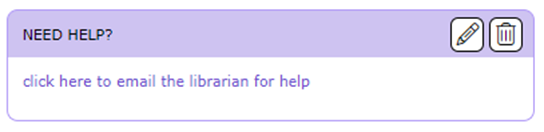
How to Create an Email Information Box In LearnPath OR News Pages
- On the News home page OR LearnPath guide, click the
 button.
 - Select Email from the drop-down menu
- The ‘ADD INFORMATION BOX – EMAIL’ screen will be displayed.
- In the Heading entry window, enter the text to be displayed as a heading in the top bar of the Information Box.
Note: If the Heading field is left blank the Information Box will be displayed without a Heading bar.
- In the Text entry window, enter the text to be displayed as the contents of the Information Box.
- (OPTIONAL) Use the Rich Text Format editor to format the heading or text. You can also add images and links if needed.
- Using the Heading Background or Content Background checkboxes, override the default color scheme to change the background color of the top bar or the information box.
- (OPTIONAL) Apply a border to the information box.
- Use the Show in Search checkbox to control whether the information box will be displayed on the LearnPath guide or News page or kept hidden.
- (OPTIONAL) The Embed and Show when embedded functionality can be used to display the information box on another application such as a web page.
- Of notable mention in this screen is the Link text and Email address fields, with the Link text field enabling you to enter text to display in place of the email address (e.g., the name of the person or department to whom the email will be sent).
- Click the Save button to save the entries. Alternatively, click the Cancel button to abandon the creation of the Information Box.
Related Guides
- How to Edit News Page or LearnPath Guide Layout
- How to Create a Text Information Box in LearnPath OR News Pages
- How to Create a Federated Search Information Box in LearnPath or News Pages
- How to Create a File Information Box in LearnPath or News Pages
- How to Create an Image Information Box in LearnPath or News Pages
- How to Create a Media Information Box in LearnPath OR News Pages
- How to Create a Resource Feature Information Box in LearnPath OR News Pages
- How to Create a Search Information Box in LearnPath OR News Pages
- How to Create a Slider Information Box in LearnPath OR News Pages
- How to Create a Slideshow Information Box in LearnPath OR News Pages
- How to Create a Task Checklist Information Box in LearnPath OR News Pages
Was this article helpful?
That’s Great!
Thank you for your feedback
Sorry! We couldn't be helpful
Thank you for your feedback
Feedback sent
We appreciate your effort and will try to fix the article