Summary
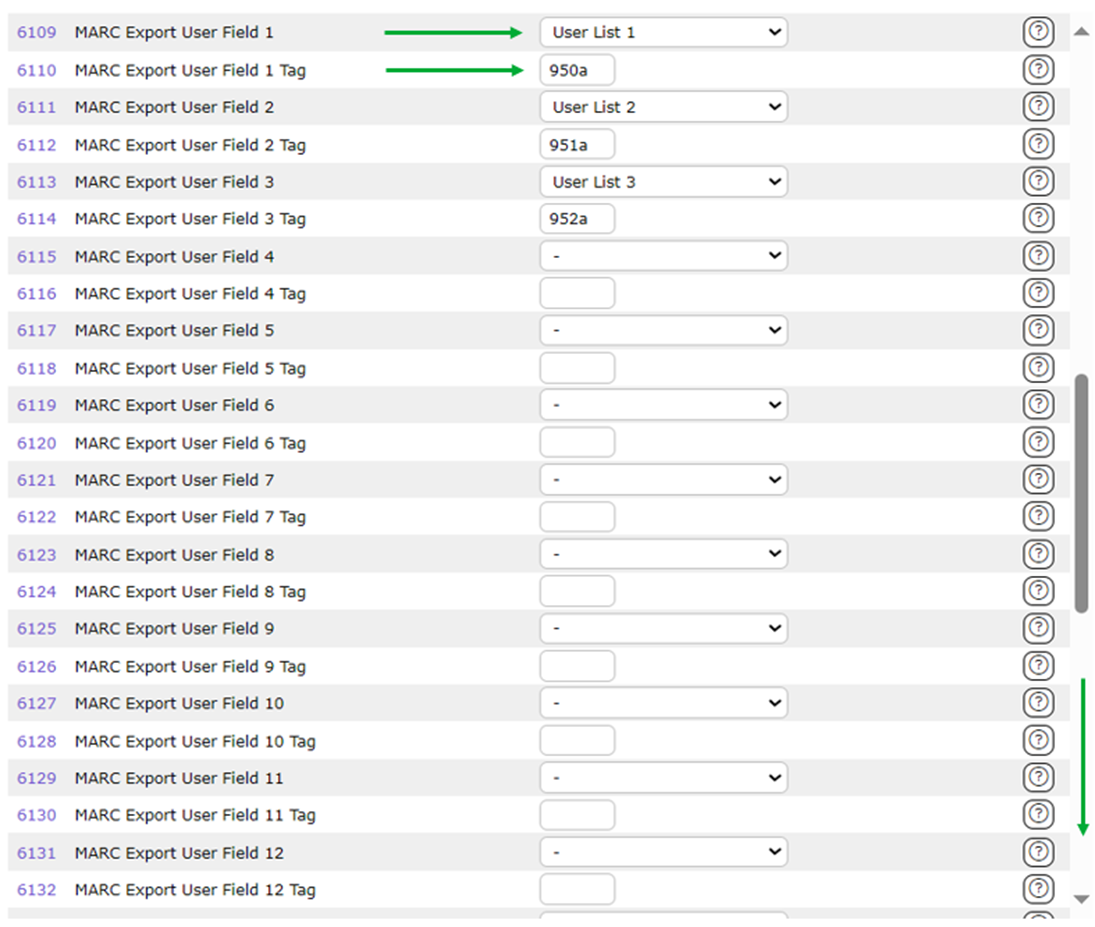
If you have a number of local MARC tags and subfields included in your MARC records, and they are to be included in MARC Export files, they can be set up for inclusion using Parameter Nos. 6109-6138. Each pair of parameters within that range provides the opportunity to designate 15 User Text/ User List fields and 15 associated MARC tags and subfields for inclusion in generated MARC Export records. You can use as few or as many, up to 15, as required.
This guide provides the steps required to configure MARC tag and subfields for inclusion when generating a MARC Export file.
Export Parameters
The following table provides the name, number and description of the applicable parameters:
Parameter |
Description |
Parameter No. 6109 – MARC Export User Field 1
| This parameter provides a drop down menu of the User List fields from which to select. If User Field 1 is to be included in the automatic MARC Export select it from the dropdown list.
|
Parameter No. 6110 - MARC Export User Field 1 Tag
| Enter the MARC tag and subfield to use for User Field 1. This should be entered as a three-digit number followed by a single character (e.g. 910a or 950z). |
Parameter No. 6111 - MARC Export User Field 2
| This parameter provides a drop down menu of the User List fields from which to select. If User Field 2 is to be included in the automatic MARC Export select it from the drop down list.
|
Parameter No. 6112 - MARC Export User Field 2 Tag
| Enter the MARC tag and subfield to use for User Field 2. This should be entered as a three-digit number followed by a single character (e.g. 910a or 950z). |
Parameter No. 6113 - MARC Export User Field 3
| This parameter provides a drop down menu of the User List fields from which to select. If User Field 3 to is to be included in the automatic MARC Export select it from the drop down list.
|
Parameter No. 6114 - MARC Export User Field 3 Tag
| Enter the MARC tag and subfield to use for User Field 3. This should be entered as a three-digit number followed by a single character (e.g. 910a or 950z). |
Parameter No. 6115 - MARC Export User Field 4
| This parameter provides a drop down menu of the User List fields from which to select. If User Field 4 is to be included, in the automatic MARC Export, select it from the drop down list.
|
Parameter No. 6117 - MARC Export User Field 5
| This parameter provides a drop down menu of the User List fields from which to select. If User Field 5 is to be included, in the automatic MARC Export, select it from the drop down list.
|
Parameter No. 6118 - MARC Export User Field 5 Tag
| Enter the MARC tag and subfield to use for User Field 5. This should be entered as a three-digit number followed by a single character (e.g. 910a or 950z). |
Parameter No. 6119 - MARC Export User Field 6
| This parameter provides a drop down menu of the User List fields from which to select. If User Field 6 is to be included in the automatic MARC Export select it from the drop down list. |
Parameter No. 6120 - MARC Export User Field 6 Tag
| Enter the MARC tag and subfield to use for User Field 6. This should be entered as a three-digit number followed by a single character (e.g. 910a or 950z). |
Parameter No. 6121 - MARC Export User Field 7
| This parameter provides a drop down menu of the User List fields from which to select. If User Field 7 is to be included in the automatic MARC Export select it from the drop down list.
|
Parameter No. 6122 - MARC Export User Field 7 Tag
| Enter the MARC tag and subfield to use for User Field 7. This should be entered as a three-digit number followed by a single character (e.g. 910a or 950z). |
Parameter No. 6123 - MARC Export User Field 8
| This parameter provides a drop down menu of the User List fields from which to select. If User Field 8 is to be included in the automatic MARC Export select it from the drop down list.
|
Parameter No. 6124 - MARC Export User Field 8 Tag
| Enter the MARC tag and subfield to use for User Field 8. This should be entered as a three-digit number followed by a single character (e.g. 910a or 950z). |
Parameter No. 6125 - MARC Export User Field 9
| This parameter provides a drop down menu of the User List fields from which to select. If User Field 9 is to be included in the automatic MARC Export select it from the drop down list.
|
Parameter No. 6126 - MARC Export User Field 9 Tag
| Enter the MARC tag and subfield to use for User Field 9. This should be entered as a three-digit number followed by a single character (e.g. 910a or 950z). |
Parameter No. 6127 - MARC Export User Field 10
| This parameter provides a drop down menu of the User List fields from which to select. If User Field 10 is to be included in the automatic MARC Export select it from the drop down list.
|
Parameter No. 6128 - MARC Export User Field 10 tag
| Enter the MARC tag and subfield to use for User Field 10. This should be entered as a three-digit number followed by a single character (e.g. 910a or 950z). |
Parameter No. 6129 - MARC Export User Field 11
| This parameter provides a drop down menu of the User List fields from which to select. If User Field 11 is to be included in the automatic MARC Export select it from the drop down list.
|
Parameter No. 6130 - MARC Export User Field 11 Tag
| Enter the MARC tag and subfield to use for User Field 11. This should be entered as a three-digit number followed by a single character (e.g. 910a or 950z). |
Parameter No. 6131 - MARC Export User Field 12
| This parameter provides a drop down menu of the User List fields from which to select. If User Field 12 is to be included in the automatic MARC Export select it from the drop down list.
|
Parameter No. 6132 - MARC Export User Field 12 Tag
| Enter the MARC tag and subfield to use for User Field 12. This should be entered as a three-digit number followed by a single character (e.g. 910a or 950z). |
Parameter No. 6133 - MARC Export User Field 13
| This parameter provides a drop down menu of the User List fields from which to select. If User Field 13 is to be included in the automatic MARC Export select it from the drop down list.
|
Parameter No. 6134 - MARC Export User Field 13 Tag
| Enter the MARC tag and subfield to use for User Field 13. This should be entered as a three-digit number followed by a single character (e.g. 910a or 950z). |
Parameter No. 6135 - MARC Export User Field 14
| This parameter provides a drop down menu of the User List fields from which to select. If User Field 14 is to be included in the automatic MARC Export select it from the drop down list.
|
Parameter No. 6136 - MARC Export User Field 14 Tag
| Enter the MARC tag and subfield to use for User Field 14. This should be entered as a three-digit number followed by a single character (e.g. 910a or 950z). |
Parameter No. 6137 - MARC Export User Field 15
| This parameter provides a drop down menu of the User List fields from which to select. If User Field 15 is to be included in the automatic MARC Export select it from the drop down list.
|
Parameter No. 6138 - MARC Export User Field 15 Tag
| Enter the MARC tag and subfield to use for User Field 15. This should be entered as a three-digit number followed by a single character (e.g. 910a or 950z). |
Was this article helpful?
That’s Great!
Thank you for your feedback
Sorry! We couldn't be helpful
Thank you for your feedback
Feedback sent
We appreciate your effort and will try to fix the article