Summary
Holds can be deleted via the resource record, the Circulation Desk and the Patron record.
This guide will provide the steps required to delete a hold via the patron record. Separate guides provide the steps required to search for a patron record, delete a hold via Circulation Desk and the resource record.
Delete a Hold via a Patron Record
- Search for the applicable patron in Circulation > Patrons.
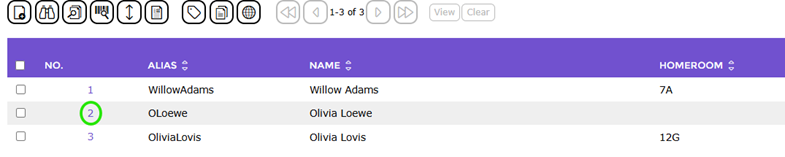
- From the resulting List screen click on the number link corresponding to the patron whose record you require, for example, 2.
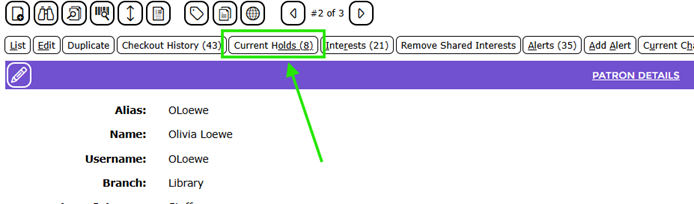
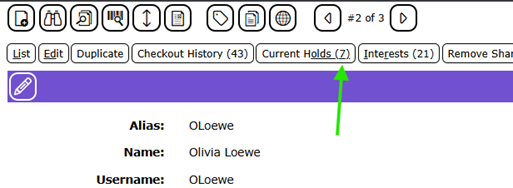
- In the patron Details screen, click on the Current Holds (x) button. The number in brackets identifies how many holds the patron currently has. In the following example screen, you can see the number in brackets is 3.
- The Holds List screen will display. The number of holds in the list matches the number in brackets next to the Hold button that was on the patron’s Detail screen.
- Click on the Edit icon corresponding to the hold to be deleted.

- The Holds Edit screen will display.
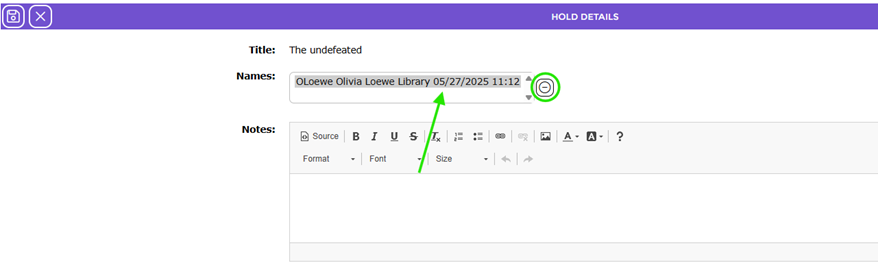
- In the Names field, click on the applicable patron, for example, Hartley, MackinVision, then click the Delete icon.
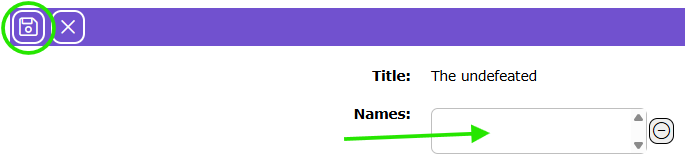
- The patron’s details no longer display in the list-box. Click the Save button to return to the Holds List screen.
If the patron was the last to be deleted, a message popup will display asking if you wish to delete the entire waitlist. Click OK.

- The Hold List screen will display. The number in the count column will be reduced by 1 for the book for which the hold was removed. The system may also no longer display the title in the holds list. (In the row where the title was, it would instead display “(not found)”.)

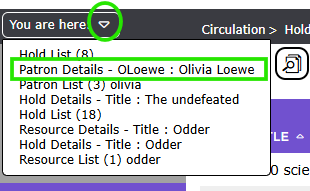
- Return to the Detail screen of the patron record again. You can do this by clicking on the You are here option at the top left corner of the screen and from the list that displays, clicking on the patron’s name .
In the patron Details screen, you can see that the number in brackets, at the end of the Current Holds button, is reduced by one to 2, reflecting that a hold has been deleted.
Note: If, for example, you want to delete this patron, you would first need to delete all holds tied to their record.
Was this article helpful?
That’s Great!
Thank you for your feedback
Sorry! We couldn't be helpful
Thank you for your feedback
Feedback sent
We appreciate your effort and will try to fix the article