Summary
Holds can be deleted via the Resource record, the Patron record and Circulation Desk. Logged-in patrons can delete their own holds via the Requests option in My Account.
This guide will provide the steps required to delete a hold via Circulation Desk. Separate guides provide the steps required to delete a hold in other areas.
Delete a Hold via Circulation Desk
1. Select the patron by scanning the patron barcode into Circulation Desk or alternatively, type in their name.
2. Click on the Hold tab.
All current holds created for, or by the patron will be listed.
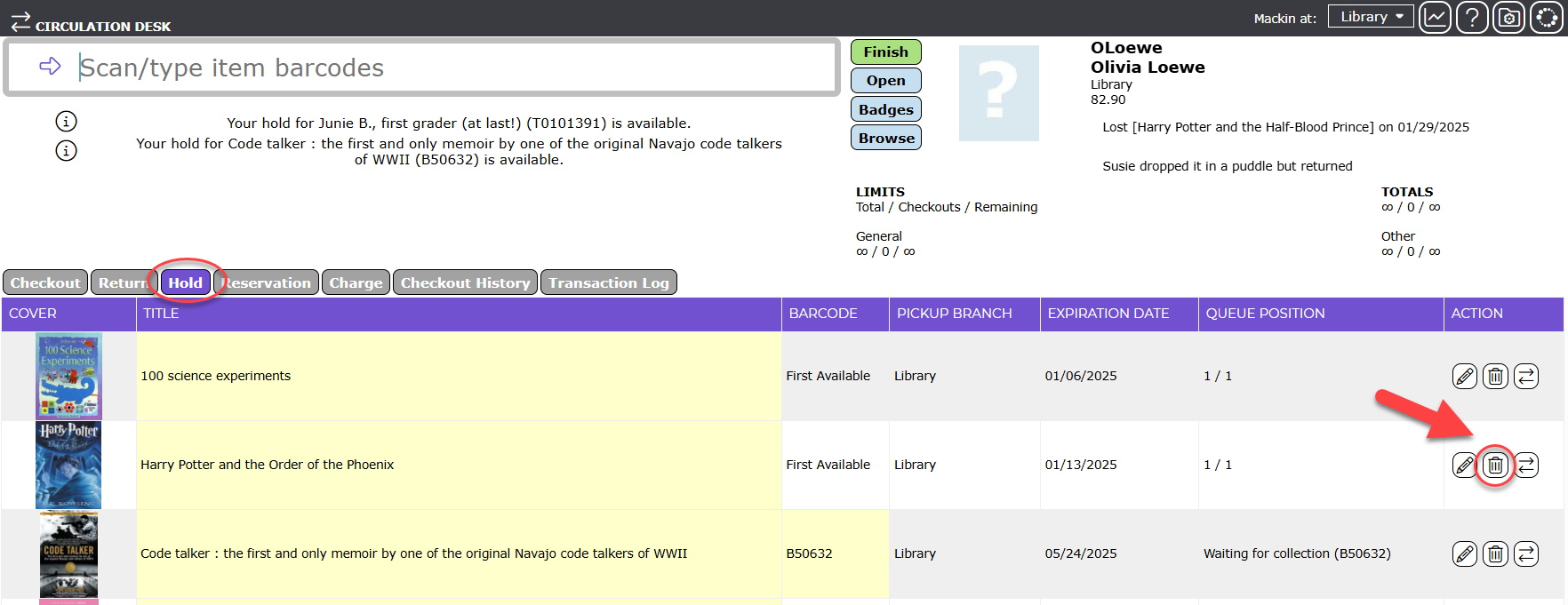
3. Click on the Delete icon corresponding to the hold to be deleted.
The hold is removed immediately.
Was this article helpful?
That’s Great!
Thank you for your feedback
Sorry! We couldn't be helpful
Thank you for your feedback
Feedback sent
We appreciate your effort and will try to fix the article