This guide explains how to set or bulk update Interest Levels for collections so that certain resources can be included in or excluded from the STAR interface based on the configured interest level range.
Overview
Collections that are not suitable for STAR users can be hidden from the STAR interface by setting their Interest Level to be outside the Interest Level range or by leaving the Interest Level blank. For example, you might not want your STAR users to see resources in the Reference or Senior Fiction collections. Either leave the Interest Level blank or set it to a very high number like ‘99’.
You can enter the Interest Level for each individual Resource record and you can update the Interest Level in bulk for all Resources with Copies in a particular Collection from the Collections settings screen.
Once a Interest Level range has been set up in Parameters, Resources will be hidden from display by STAR if they:
- Have a blank value for Interest Level;
- Have a value for Interest Level that is greater than the Maximum Interest Level or less than the Minimum Interest Level.
How to Set up Interest Levels by Collection
- Navigate to Management > Collections
- Click the Edit icon
 for the Collection you want to change.
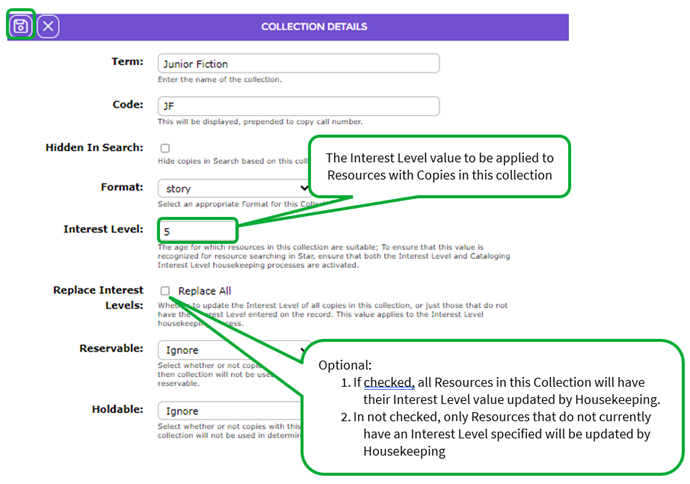
- Enter a value into the field Interest Level that should be applied to Resources with Copies in this Collection.
- Check the Replace Interest Levels Replace All checkbox if you want the Interest Level to be replaced even if a resource already has a value specified. If not checked, only Resources that have a blank Interest Level will be updated by Housekeeping.
- Click the Save icon
 to save the changes.
 - After the Housekeeping has run, the Replace Interest Levels option will be un-checked automatically.
Was this article helpful?
That’s Great!
Thank you for your feedback
Sorry! We couldn't be helpful
Thank you for your feedback
Feedback sent
We appreciate your effort and will try to fix the article