Summary
Holds can be deleted via the Circulation Desk, the patron record, and the resource record. Logged in patrons can delete holds via their My Portal > Requests > Holds tab.
This guide will provide the steps required to delete a hold via the Resource record. Separate guides provide the steps required to delete a hold via the patron record, the Circulation Desk.
- Search for the applicable resource record in Cataloging > Resources.
- From the List screen click on the record number to open the Resource Details screen.
- In the resource Detail screen, click on the Current Holds (x) button. The number in brackets identifies the number of holds for the title.

- The Hold Detail screen will display. Click on the Edit icon or button.
- In the Names list box, click to highlight the patron whose hold is to be deleted and click the Delete (minus sign) icon.
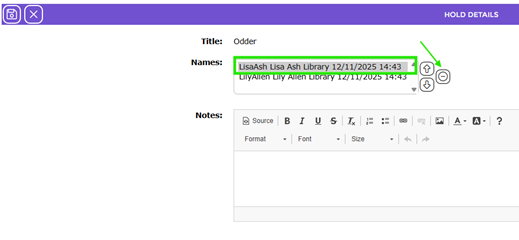
- Click the Save icon to save changes to the Hold Details.
Was this article helpful?
That’s Great!
Thank you for your feedback
Sorry! We couldn't be helpful
Thank you for your feedback
Feedback sent
We appreciate your effort and will try to fix the article