Summary
Users with News page editing permissions may create customized News Pages that are viewable by specific sets of patrons. Schools can have as many News Pages as required, and customize which patrons can view each News page.
Create a News Page
1. Open the News pages tab, located in the Search interface header. 
2. Select Manage news pages. 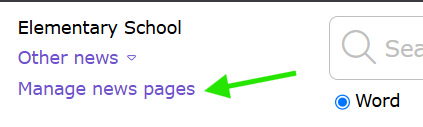
3. Click the Add news page button.
4. Allocate a name to the News page (e.g., Book Club) and specify either Copy existing page or Create blank page. Press Next to proceed.
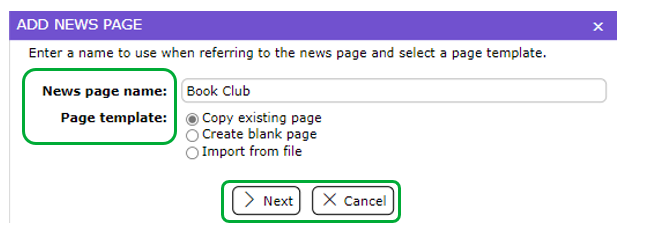
When selecting Copy existing page, a list of your existing News pages will be available to select from.
Newly created News pages default to Hidden status.
5. To edit the News page, click the Edit button. Confirm the title, and click Next.
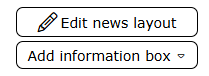
6. Click the Edit news layout button or the Add information box button. See linked guides at the end of this guide for instructions on adding information boxes.
7. When finished editing, return to Manage news pages.
Assign Patrons to a News Page
1. On the Manage news pages screen, click Assign Patrons.

2. Choose a patron selection from the available list and click Assign. Or, to create a new Patron Selection category, click New.
3. Determine the Patron Selection by grade level, patron loan category, homeroom class, etc. Then, press the Save button.
4. Choose the new patron selection from the available list and click Assign.
Change the News Page Viewability
1. On the Manage news pages screen, click the Change button to make the News Page viewable.
2. Select "All can see" to allow all patrons to view the news page, or "only assigned see" to limit access to only the assigned patrons.
3. Use the Drag and Drop column to order News Pages by priority visibility. Patrons assigned multiple News Pages will open to the page highest in the list first.
Related Help Guides
How to Create a Text Information Box in LearnPath OR News Pages
How to Edit an Information Box in News Pages
How to Create and Configure Sliders
How to Change the Color and Font Style of Text in an Information Box
How to Add Multiple URLs in an Information Box
Here are some additional help guides that related to News Pages, notably how to create and edit each type of information box.
Was this article helpful?
That’s Great!
Thank you for your feedback
Sorry! We couldn't be helpful
Thank you for your feedback
Feedback sent
We appreciate your effort and will try to fix the article