Summary
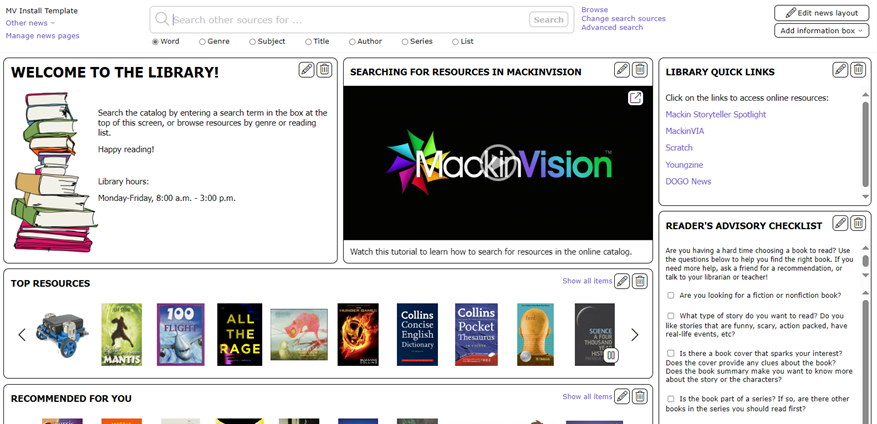
Information boxes are available in the library’s Home page to provide authorized staff with an easy to create and edit notice board feature. The boxes can be used to promote upcoming activities, add a carousel of images of new or customized lists of resources, provide tips on how to search for resources, establish “slideshows”, RSS feeds or links to websites of interest.
This guide will provide the steps required to create, edit, and delete an Information Box for inclusion on the Home page.
Home Screen With Information Boxes
Edit Information in an Existing Box
Information can be edited if, for example, it needs updating or a typo needs correcting.
- Click on the Edit icon on the information box to be edited.

- The information box Edit screen will display.
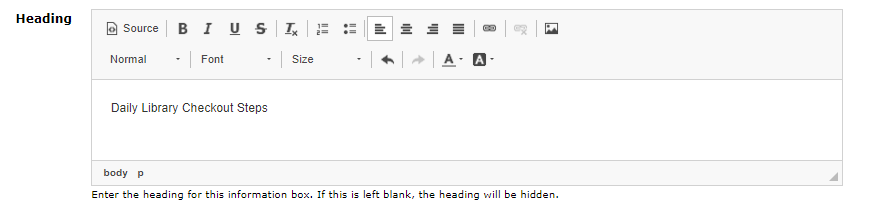
- Scroll to the field containing the information to be edited or removed. In the example used here, the existing Heading text has been changed to ‘Daily library checkout steps’.
- Click the Save option to return to the Home screen.
Delete an Information Box
- In the applicable box click on the Delete (dustbin) icon.

- The information box will be deleted and no longer displays on the Home screen.
NOTE: Once an information box is deleted, it cannot be recovered. If you simply want to "hide", e.g. until it is complete, or until a different time of the year, Edit the information box and remove the check next to Show in Search., then click the Save button.
Was this article helpful?
That’s Great!
Thank you for your feedback
Sorry! We couldn't be helpful
Thank you for your feedback
Feedback sent
We appreciate your effort and will try to fix the article