Summary
The order, from left to right, of Patron Loan Categories (PLCs) in the Lending Matrix screen can be changed if required.
This guide will provide the steps required to change the order of PLCs. A separate Guide provides the steps to creating the elements, one of which is the PLCs that make up the Lending Rules Matrix.
Change the Order of PLCs
The example will provide the step required to change the position of the Technical Staff PLC column in the Matrix screen from second position to last.
- Navigate to Circulation > Lending Rules.
- The Lending Rules Matrix screen will display.
- Click on the Set PLC Display order button.
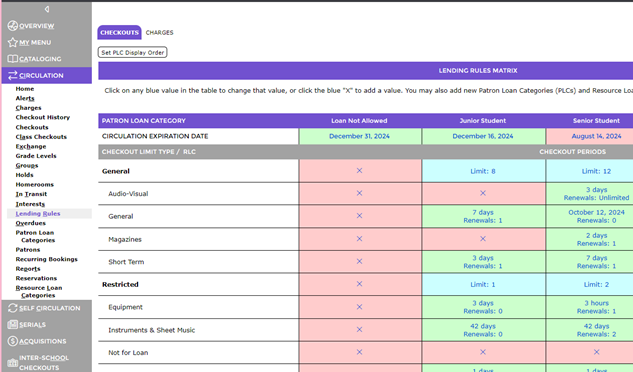
- The Set PLC Display Order popup screen will display.
- Highlight the PLC whose order is to be changed, in this example, Staff.
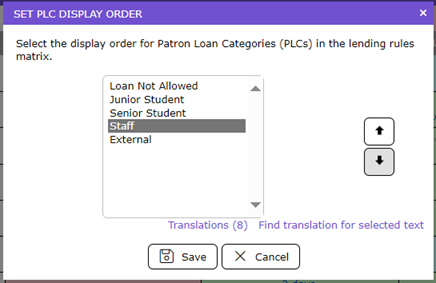
- Click on the Down arrow until the PLC is positioned as required.
- In the example screen note that Staff is now positioned at 2nd from the bottom with all other PLCs have moved up one place in the list.
- Click the Save button.
- The Lending Rules Matrix screen will display and the PLC will now display as the 2nd from the last of the PLC columns.
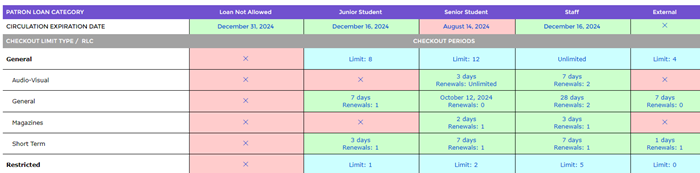
Note: All of the other PLCs will have moved one position across.
Was this article helpful?
That’s Great!
Thank you for your feedback
Sorry! We couldn't be helpful
Thank you for your feedback
Feedback sent
We appreciate your effort and will try to fix the article