Summary
The Resource Boxes feature is useful for corporate, special, and education libraries as a way to link a number of copies, from different resources that have a common theme or subject, or a number of copies of a single resource title, within a physical container. The box has its own copy record created via the Resource Box button on an applicable resource record. This feature is especially useful for catering for classes of students studying a particular course, or groups of employes working on a particular project, for example.
A separate guide provides the steps required to create, link copies to, and circulate a resource box.
Overview
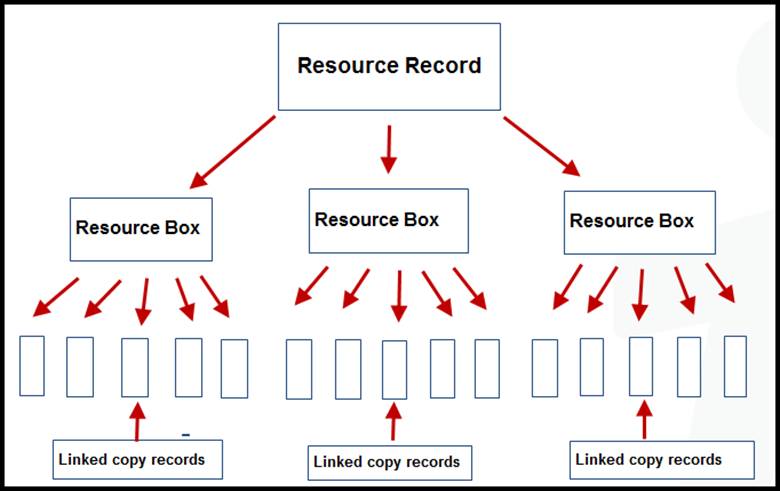
A Resource Box is a physical item with its own barcode. Each Resource Box contains a set of links to the copies of the Resources contained in that box. These details are viewed via Cataloguing > Resource Boxes. There is no limit on the number of copies that can be tied to a Resource Box nor is there a limit on the number of different resources that can be included in a Resource Box. For example, a Resource Box for Teaching for Learning Disabilities may contain five copies of the same resource, and a Resource Box for Teaching for Learning Disabilities may contain several copies, but each copy is from a different resource record. Resource Boxes can also be nested, that is, a Resource Box can contain another Resource Box.
While the copies tied to a Resource Box do include their own barcode, when the barcode of a Resource Box is scanned, all of the copy records in that box are automatically issued to the applicable Patron. The Lending Rules controls how many Resource Boxes each Patron can checkout based on their Patron Loan Category (PLC) and the limit on the number of Resource Boxes that can be loaned, which is set on the Checkout Limit Type (CLT). The number of checkout items a Patron can have is also set in the CLT. As an option, the contents of Resource Boxes can be issued individually to Patrons who have reached the limit of the number of boxes they can borrow if the limit on the number of copies they can checkout has not been reached.
When a Resource Box is returned, Staff can just scan the box’s barcode. A list of all the copies tied to the box will display for checking/information purposes and are returned. Alternately, each copy in the box can be returned individually.
Each Resource Box is created as a specialized copy record. If there are several Resource Boxes that have similar contents or if there are several different boxes for the same class, it is recommended that only one resource record is created. That resource record would then have one copy record per physical Resource Box.
The contents of each Resource Box, that is the individual copies, are cataloged as a normal copy record. There are no additional requirements for copies that are placed into a Resource Box. Copies can be added or removed from a Resource Box at any time.
A resource record with a few resource boxes each with linked copies example:
A resource record with one resource box containing linked copies example:
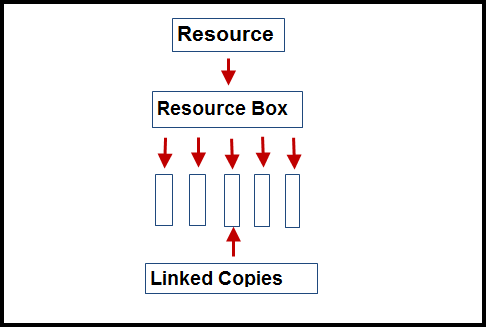
A resource box can be viewed as a single checkout item, irrespective of how many linked copies it includes, or both the box and each one of its contents considered individual checkout items. This is determined by a parameter setting. There is no limit to the number of copies that can be linked to a resource box.
Resource Box Functionality Requirements
There are several parameters related to resource boxes. The settings on the Lending Rule elements of Resource Loan Category and Checkout Limit Types must be correctly set.
Parameters
Parameter No. 1107 - Enable Resource Boxes: This parameter requires a Yes/No response. Yes must be chosen if the functionality is to be implemented.

Parameter No. 3038 - Custom Resource Box Item Sound In this parameter field, you locate and upload the sound file to play when issuing an item that is part of a box. This is not a mandatory parameter.
Parameter No. 3039 - Custom Resource Box Return Sound: In this parameter field, you locate and upload the sound file to play when returning a resource box. This is not a mandatory parameter.

Parameter No. 3208 – Resource Box Contents Count Towards the Checkout Limit: This parameter determines if each of the copies included in the resource box count towards the patron’s checkout limit when a resource box is issued to them. Chose Yes if all copies, included in the resource box, are counted as individual checkouts. Choose No if the box and contents are counted as one individual checkout.

Lending Rule Settings
In the Lending Rules, the Checkout Limit Type (CLT) determines the number of copies and resource boxes with a Resource Loan Category (which must be selected on Copy records) and that can be loaned by patrons with a particular Patron Loan Category (one of which must be selected on Patron records).
Example:
In the following screen example, the CLT is set for the Resource Loan Category (RLC) of General and the Patron Loan Category (PLC) of Staff. Any CLTs set for RLC and corresponding PLCs are identifiable by a pale blue cell.
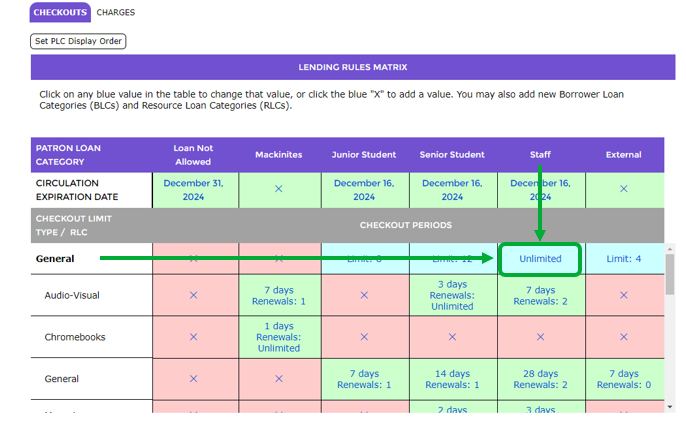
Note: Pink cells with an ‘X’ indicate limits have not yet been set.
Clicking on the pale blue cell displays the Limit popup screen. The screen includes two limit options – a Copies Limit and Resource Box Limit.
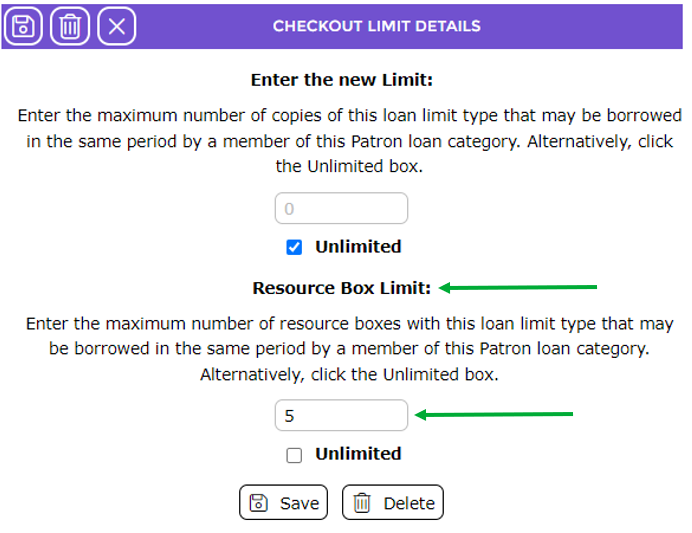
If, for example, Parameter No. 3208 Resource Box Contents Counts Towards the Checkout Limit is set to Yes (the default setting), a patron cannot checkout a resource box if the number of copies in the box exceeds the number of copies the patron is permitted to checkout. The limit on the number of boxes a patron can checkout is a checkout limit setting completed via the Lending Rules Matrix. The limits can be overridden if the logged in Circulation Staff member has permission to do so.
Regardless of Parameter No. 3208’s value, the box itself is counted as a copy against the CLT’s Copies Limit. For example if a box applies to the CLT for General, and 10 copies in the box are also General items, when issuing the box it counts as one and is additional to the 10 copies bringing the number of items the patron has on checkout, to 11.
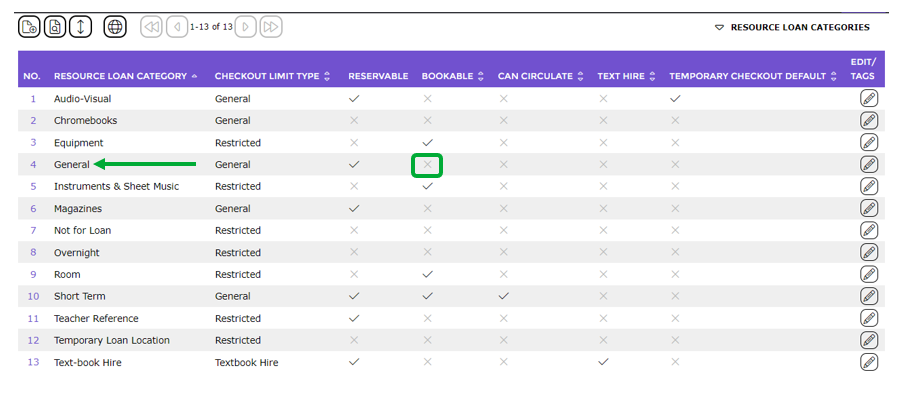
The RLC tied to any copy that is to be linked to a resource box should not be flagged as Bookable (aka ‘able to be put on Hold’), as Bookable copies cannot be linked to the box. In the example screen below the RLC of General is not set as Bookable.
TIP:
The RLC selected on the resource box itself can, however, be flagged as reservable (aka ‘able to reserve it for a set period of time in the future’). This is to ensure patrons can reserve the boxes with their content. That is however, the exception to the rule.
Was this article helpful?
That’s Great!
Thank you for your feedback
Sorry! We couldn't be helpful
Thank you for your feedback
Feedback sent
We appreciate your effort and will try to fix the article