Summary
When an OPAC search returns no results, the “Your search was not successful” popup screen will display. If the Were you searching for… function is enabled for the library an alternate word may be provided. The alternate word is a link which, when clicked, will return a list of titles for that word. The screen also provides several search tips including a Check your spelling and Search using a different word along with a Request this item link. Note that the Search field is always available enabling the User to change the search term or correct the original search term and complete another search.
This guide provides a brief explanation of the options that display when a search is not successful.
Failed Search
Complete a search in the Search interface in the usual manner. Use a misspelled term, e.g. ellefant (instead of elephant). If no results are returned, a message will display noting the search was unsuccessful.
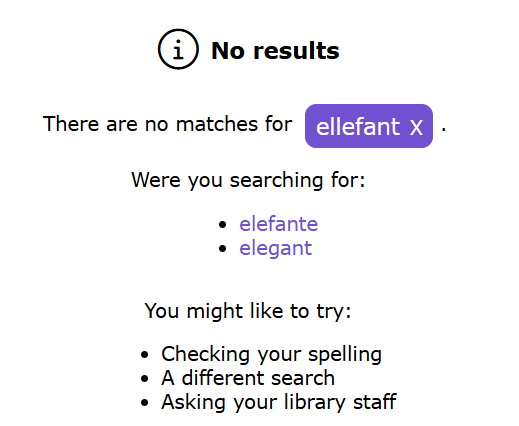
The Were you searching for: <alternate words list> option will display if the misspelled term is included on the Dictionary record of the correct term. Any provided alternate words are links which, when clicked, will return a list of titles for that word. There is also a list of search tips provided.
If there is no alternate term, the message noting the search was unsuccessful will display along with the list of search tips for the User.
The search tips include:
Check your spelling – It may be possible that you misspelled the search term. If it is incorrect, change it to the correct spelling in the Search field then click the Search icon or the Enter key on the keyboard.
Search using a different word –if there is no results list matching the term try entering a different word for what you want in the Search field instead then click the Search button again.
Ask your library staff
Was this article helpful?
That’s Great!
Thank you for your feedback
Sorry! We couldn't be helpful
Thank you for your feedback
Feedback sent
We appreciate your effort and will try to fix the article