Summary
Tags can be added to resource, copy and patron records individually or in bulk. Those tags that have been added to a number of records can be deleted from those records in bulk.
This guide will provide the steps required to delete a tag from multiple records. Separate guides provide the steps required to delete a tag from a single record and add a tag to a single or multiple copies.
Delete a Tag from Records in Bulk
The example steps will show you how to delete the ENV001 tag from a number of Patron records. The process to delete tags in bulk for other record types is the same with the exception of the selection made in the Entity field in the Tag Manager screen.
- Navigate to Management > Tag Manager to access the Tag Manager screen.
Note: The Tag Manager screen is also accessible via the Resources, Copies and Patrons List and Detail screens for example.
- Click on the down arrow at the end of the Area field, select Patron from the drop-down list then click the Get Tags button.
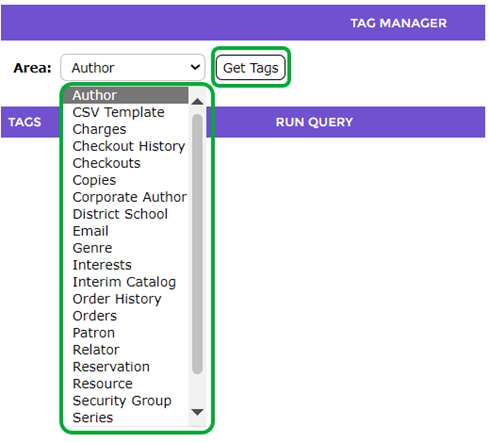
- A list of tags tied to Patron records will display.
Note: The Area selected will depend on the record types, for example, resources, copies, or checkouts.
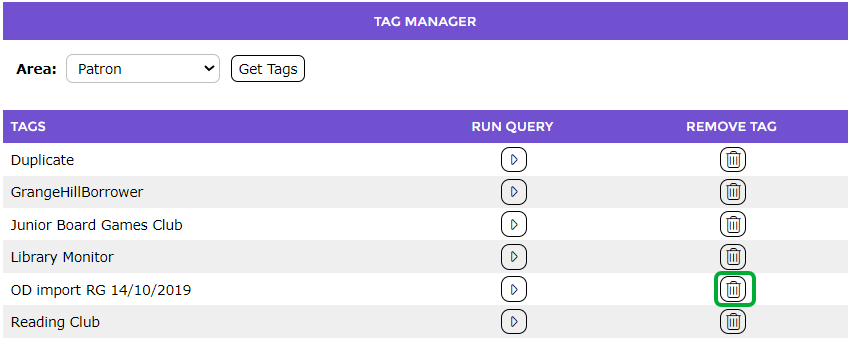
- Click on the Remove tag (trash can) icon corresponding to the tag to be deleted from the Patron records, for example OD import RG 14/10/2019.
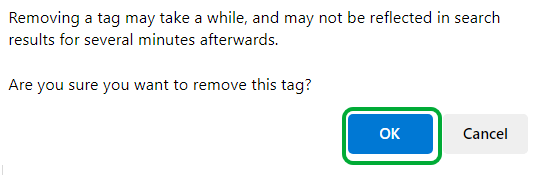
- A warning popup message will display noting that removing the tag may take several minutes, and do you want to remove the tag. Click OK.
- The Patron List screen will display.
- The Patron records listed have now had the ENV001 tag deleted.
Note: The records in the List screen may still include a Tag icon indicating the record include a tag however it will be a different tag. To confirm the tag is not the one recently deleted, hover over the Tag icon and the name of the tag will display as a tool tip.
Was this article helpful?
That’s Great!
Thank you for your feedback
Sorry! We couldn't be helpful
Thank you for your feedback
Feedback sent
We appreciate your effort and will try to fix the article