Sites such as BestMARC will provide their z39.50 database connection details to BestMARC members; however, there are other sites such as Library of Congress whose details are available to anyone.
Lists of z39.50 sources and connection details are also available on sites such as https://www.z-brary.com/ and https://irspy.indexdata.com/
Create a Z-Cataloging Source
1. Navigate to Cataloging > Z-Cataloging.
The Search Z-Cataloging screen will display.
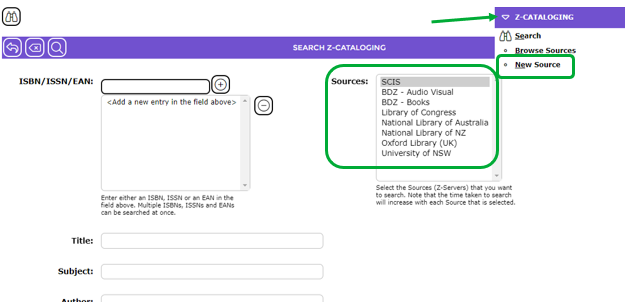
Any previously created Sources will display in the Sources list box.
2. Select New Source from the Z-Cataloging menu.
The Select source type pop-up screen will display.

3. Click on Z39.50
4. Click the Add button.
The Add Z-Cataloging Source screen will display.
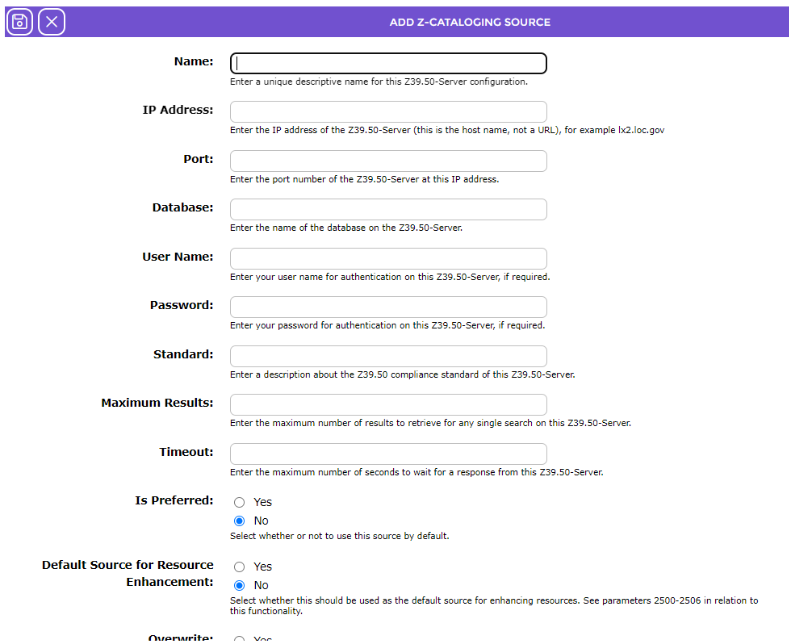
5. When all required details have been completed, click the Save button.
The new Source will be included in the List screen.
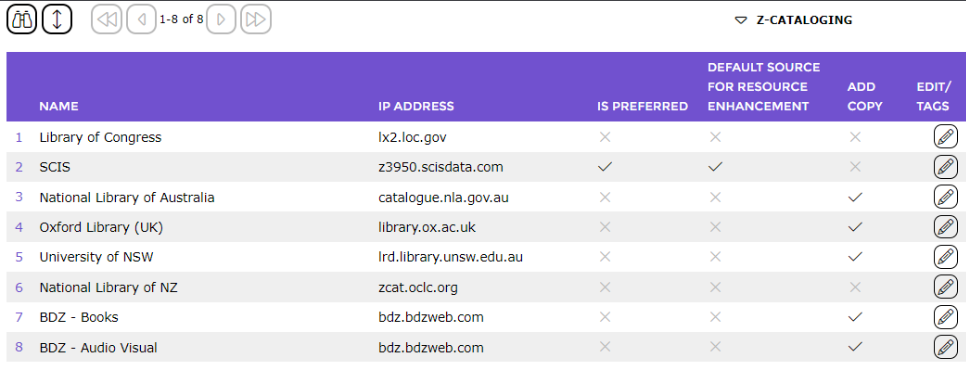
To add further sources whilst you are in the Z-Cataloging > List screen, repeat Steps 1-5 for each one.
Was this article helpful?
That’s Great!
Thank you for your feedback
Sorry! We couldn't be helpful
Thank you for your feedback
Feedback sent
We appreciate your effort and will try to fix the article