Summary
There are many parameters relating to the configuration and behavior of the Search interface. These are separated into several sub-sections within the Management > Parameters screen. The setting selected, or the values entered, will determine the options and functionality available in the Search interface. The convention for parameters includes a parameter number and name. Parameters will generally require a Yes/No response, text/value entry or a selection from a drop-down list.
This guide will identify the Search interface specific parameter numbers and names for the standard Search page. The STAR parameters are covered in more detail in a separate Overview guide. The Parameters Guide, available in the Help interface, provides an explanation of each parameter and a section on how to edit parameters.
Accessing Search Interface Related Parameters
Parameters are accessed by navigating to Management > Parameters from MackinVision Management Console.
Click the Search option drop-down menu to access the related sub-menu options. 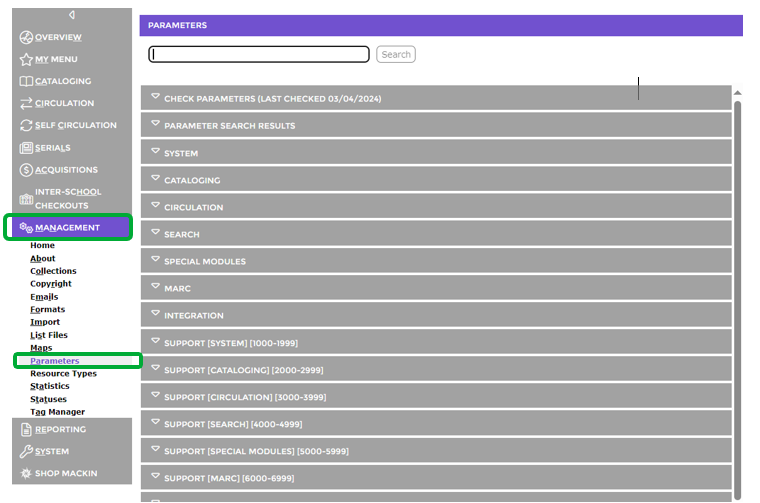
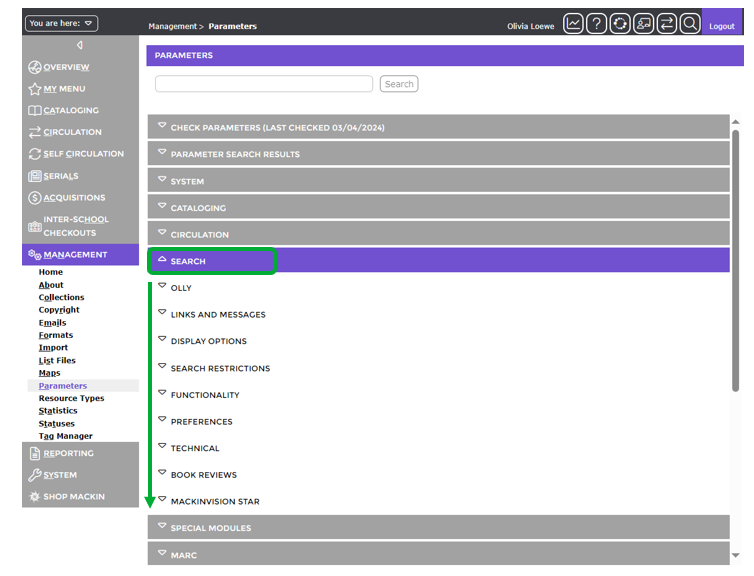
Each of the sub-menu options includes an Arrow icon. Clicking on a sub-menu arrow icon displays the related parameters.
Links and Messages Parameters
Parameter Nos. 4100 – 4103. These parameters provide staff with the option to enter the URLs of approved websites that may be of interest to patrons.
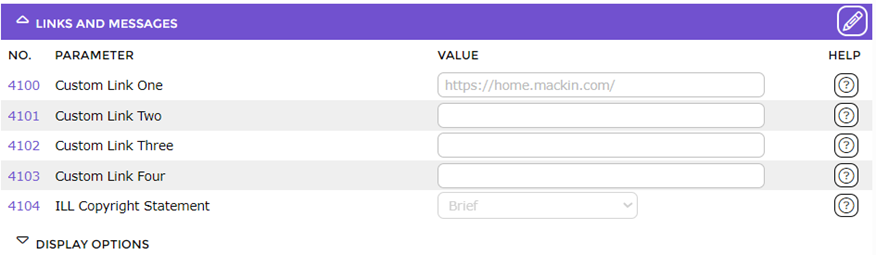
Note: Parameter No. 4104 – ILL Copyright Statement, is also included in this section. If you want to include a copyright statement on interlibrary loan requests, select the preferred statement from the drop-down list. Copyright statements can be added via the Management > Copyright screen.
Once any of the parameters are completed a Links option will display on the main menu bar on the Search interface. The number of links that display, when the Links menu option is clicked, corresponds to the number of link parameters that include a URL.
The links names can be changed via Translations to identify the website to which the link provides access. Configuring these parameters is not mandatory.
Display Options Parameters
Parameter No.4201 – Extended Title Format
Parameter No.4203 – Display Homeroom in ‘About Me’
Parameter No.4205 – Display Unused Relations
Parameter No.4206 – Group Similar Items
Parameter No.4307 – Display Author Relators
Parameter No.4208 – Display Corporate Author Relators
Parameter No.4309 – Display Publisher Relators
Parameter No.4310 – Display Series Relators
Parameter No.4219 – The number of Entries for Authority Control Files List
Parameter No.4225 – Authority Control Prediction List Width (selected Terms)
Parameter No.4226 – Slideshow Rotation Speed
Parameter No.4227 – Responsive Home Page
Parameter No.4228 – Search Results View (Default)
Note: Parameter Nos. 4212 – 4218 are for the User Authority Relators and only applicable if you have created your own custom relators.
Search Restrictions Parameters
Parameter No.4300 – Search Documents (Default)
Parameter No.4301 – Search Available Items Only
Parameter No.4302 – Show STAR and Olly Interest Level Range Parameters (Note that if Yes is chosen for this parameter, the following 2 parameters will be available for completion:
Parameter No.4303 – Minimum Interest Level
Parameter No.4304 – Maximum Interest Level
Functionality Parameters
Parameter No.4400 – Sort By (Default)
Parameter No.4401 – Sort Order Ascending (default)
Parameter No.4402 – Enable Library Maps
Parameter No.4404 – Clear Previous Query
Parameter No.4405 – Search Limit for Child Resources
Parameter No.4406 – Search Limit for Resources
Parameter No.4407 – Enable Sort on UserDate
Parameter No.4408 – Enable Sort on DateEntered
Parameter No.4410 – Authority Control Search Type
Parameter No.4411 – Browse General Alphabetical Ranges
Parameter No.4412 – Browse title Alphabetical Ranges
Parameter No.4413 – Allow Holds if Any Copies Available
Parameter No.4414 – Prevent Renewal if Overdues Exist
Parameter No.4415 – Enable Detail Page Book Cover Slider or Carousel
Parameter No.4416 – Allow Anonymous Search Requests
Parameter No.4417 – Enable Sort on Author
Parameter No.4418 – Order History Sorting
Parameter No.4419 – Were You Searching For Maximum Results
Parameter No.4420 – Enable RSS Feed
Parameter No.4421 – Enable Prefix Searching
Parameter No.4422 – Enable Authority Relational Predictions
Parameter No.4423 – Allow hold pickup other than patron branch
Preferences Parameters
Parameter No.4500 – Search Mode (Default)
Parameter No.4501 – Search Interface Default Search Operator (Default)
Parameter No.4502 – Email to Current User (Default)
Parameter No.4503 – Email Cart for New Search
Parameter No.4504 – New Items Identified by Tag
Parameter No.4505 – Request Method
Parameter No.4506 – Send Simple Requests
Parameter No.4511 – Search Allows Anonymous Users
Parameter No.4512 – Store Search Usage Statistics
Parameter No.4513 – Internal IPs for Search Usage Statistics
Parameter No.4514 –Resource clicks that count as checkouts
Parameter No.4515 – Display Shortened URLs
Parameter No.4516 – Highlight Search Terms
Parameter No.4517 – Display Availability Icons
Parameter No.4518 – Ignored Terms for Highlighting
Parameter No.4519 – Basic Search Field Selection
Parameter No.4520 – Basic Search Field (Default)
Parameter No.4521 – Search Result Call Number
Parameter No.4522 – Search Field Group
Parameter No.4523 – Enable Classic Search
Parameter No.4524 – Search Homepage
Parameter No.4525 – Ask Information Box Conversion Question
Parameter No.4526 – Expand Faceted Search
Parameter No.4527 – Faceted Search Order
Technical Parameters
Parameter No.4600 – Inactivity Session Refresh Time
Parameter No.4602 – Classic Search Results per Page
Parameter No.4603 – Suggestion List Limit
Parameter No.4604 – ISBN Based Image File Path
Parameter No.4605 – Book Wizard Path
Parameter No.4606 – Copies Per Hover Window
Parameter No.4607 – Results of Matching Issues per Fetch
Parameter No.4608 – Accelerated Reader URL
Parameter No.4609 – Inactivity Session Refresh Warning Period
Parameter No.4610 – MARC Export Format
Parameter No.4611 – Search Results Per Page
Book Reviews Parameters
These parameters relate to the generic review and rating feature. For those subscribed to LibraryThing or ChiliFresh, the related parameters are located under the Integration section of Parameters. Note that you can only use one review and rating option.
Parameter No.4700 – Show Book Parameter Review Parameters
Parameter No.4701 – Reviews per Page
Parameter No.4702 – Terms of Use Text
Parameter No.4703 – Ratings and Reviews Moderation Level
Parameter No.4704 – Review Pending Approval Message
Parameter No.4705 – Approved Review Message
Parameter No.4706 – Rejected Review Message (Default)
Parameter No.4707 – Display Add Review Link on List Screen
Parameter No.4708 – Reviewer Identity
Parameter No.4709 – Ratings Require Reviews
Parameter No.4710 – Reviews Sort Order (Default)
Parameter No.4711 – Show Book Reviews on Detail Page
Parameter No.4712 – Email Moderation Messages
Third Party Book Review Options
If you are subscribed to Chilifresh or LibraryThing complete the parameters applicable to your book review product. You cannot then use the book review option provided by Softlink.
ChiliFresh Parameters
Accessed via Management Parameters > Integration > ChiliFresh.
Parameter No.7600 – Show ChiliFresh Parameters
Parameter No.7601 – ChiliFresh Account Code
Parameter No.7602 – ChiliFresh URL
Parameter No.7603 – ChiliFresh API Key
Parameter No.7604 – Display Add Review Link on List Screen
Parameter No.7605 – ChiliFresh Cover Images URL
LibraryThing
Accessed via Management Parameters > Integration > LibraryThing.
Parameter No.7700 – Show LibraryThing for Libraries Parameter
Parameter No.7701 – LibraryThing for Libraries Account Code
Parameter No.7702 – LibraryThing for Libraries URL
Parameter No.7703 – Display Add Review Link on List Screen
Parameter No.7704 – Enable Library Anywhere Redirect
STAR Parameters
These parameters relate to the STAR search interface.
Parameter No.4800 – Show STAR Parameters
Parameter No.4801 – Theme (Default)
Parameter No.4802 – Background (Default)
Parameter No.4803 – Me Icon for Boys (Default)
Parameter No.4804 – Me Icon for Girls (Default)
Parameter No.4805 – Results Per Page
Parameter No.4806 – Short Library Name
Parameter No.4807 – Season Images
Was this article helpful?
That’s Great!
Thank you for your feedback
Sorry! We couldn't be helpful
Thank you for your feedback
Feedback sent
We appreciate your effort and will try to fix the article