Summary
The Relevance Sort option ranks results by determining the number of times the search term appears in each resource and then divides it by the number of times that word appears in the entire database. The outcome of this process ensures that multiple hits on extremely common words such as “the” will mean it ranks lower than a few hits on less common words. Relevance will also be affected to a lesser degree by settings established in the System > Field Group option.
This guide will explain the logic applied to the return order of results lists and provide some examples of results lists based on relevancy and sort order.
System Default Sort Setting Parameter
Relevance is the system default sort method so search results for an entered phrase or term will be based on relevance. Relevance is available in the Basic Search screen.
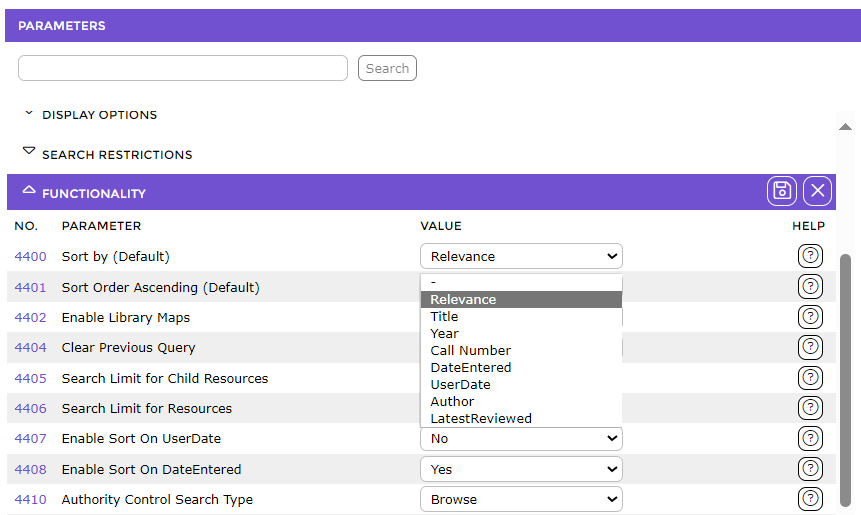
Parameter No. 4400 – Sort by (Default). This parameter includes a dropdown list of options. Relevance would most commonly be selected as the default if completing a basic search however a different option can be selected if preferable.
Best Match
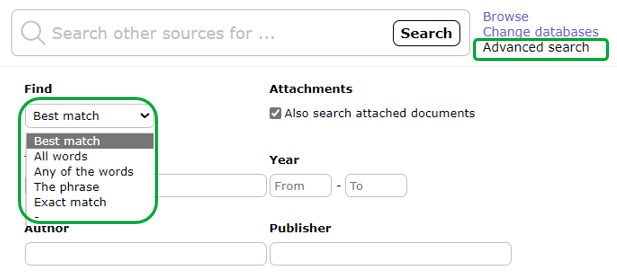
The Best Match sort option is available from the drop down list, below the search term entry field, in the Advanced Search screen. Best Match also uses relevancy ranking to Search Results. Patrons can choose a different sort option if preferred.
Relevancy Algorithm
The system calculates the order of the returned results by:
- Counting the number of times each of the words in the search term appears in each document or record returned from the search
- Dividing that count by the number of times that word appears in the entire database (catalog)
- Ensuring that multiple hits on common words such as “the” will rank lower than fewer hits on less common words such as “cow”
Example of Relevancy Ranking for a Search Term
Assume that doing an Any Word search for the term “the brown cow” returns a results list containing multiple resources which match some or all words used in the string:
- In one of those records, the term “the” might appear 10 times across various fields (for example, Notes, Title etc.) in a specific record. However, the term “brown” appears only 4 times while only there are only 2 occurrences of the term “cow”.
- In another record, the term “the” appears 50 times but there is only 1 occurrence of both “cow” and “brown”.
The former record is therefore a better match as the occurrence of the term “the” is less in the first record relative to the number of times the other 2 terms occurred giving it a higher relevancy ratio.
Note: Relevancy ranking for a Phrase search will work in the same manner as an Any Word search because when in Phrase mode the system treats the phrase as a single word.
Mathematical example:
Again using the Any Word search of “the brown cow”, and assuming the term “the” occurred 1000 times in the entire catalog, “brown” appears 10 times and “cow” appears 5 times, the algorithm will calculate the overall “score” for the first record in the following manner:
“the” = 10/1000 = 0.01
+
“brown” = 4/10 = 0.4
+
“cow” = 2/5 = 0.4
Therefore the relevance equals 0.81.
The algorithm will calculate the overall “score” for the second record in the following manner:
“the” = 50/1000 =0.05
+
“brown” = 1/10 =0.1
+
“cow” = 1/5 =0.2
Therefore, relevance is 0.35.
The additional factor relating to search results is the weighting, allocated by the system, to fields within Field Groups. Although it plays a lesser role in the relevancy ranking of records returned in a search, it will have an impact on search results particularly in the Search interface. Please note that this weighting is hardcoded.
For example, if the Patron uses the Any Word search via the Search interface, the system searches on a number of different fields (including Title, Notes and Author). This uses the relationships set up via System > Field Group. The system assigns each field within a Field Group its own weighting. It does this to ensure a record may match a query in both its Title and Notes fields for example. A hit on a Title will rank more highly than a hit on terms in the Notes field that match the search term. Therefore, the system attaches more weight in the database to the Title field than it does the Notes field in the Any Words Field group.
Note: If the system returns an unexpected ranking result, it may be due to the application of extra restrictions determined by certain library established rules settings. For example, certain material types or specific titles may be set as “hidden” and therefore not be returned in search results.
Best Match Search
The Best Match option is available for selection on the Advanced Search screen in the Search interface. Remember, Best Match also depends on the relevancy algorithm to list results in matching order. The results depend on:
- whether there is an exact match for the term
- the frequency of the term in relation to the whole database
- the weighting of the fields in which some or all of the terms in the search are located
- whether library settings impact the return of titles in any search result
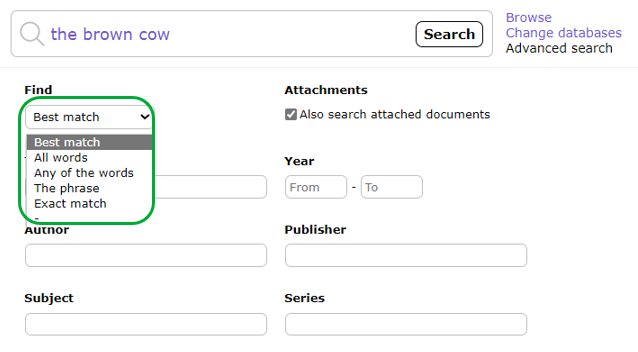
Once a search is instigated, it will use the relevance algorithm to produce a list of resources based on the criteria and relevance.
In the following example search, the term ‘the brown cow’ is used with Best Match selected as a search type. The results List shows 20 titles are returned.
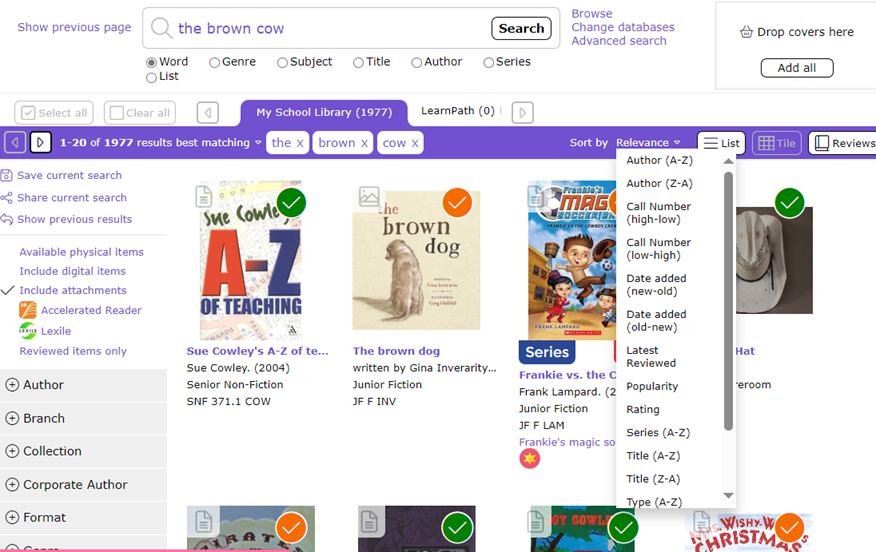
Some results would appear to be incongruous, however further viewing of a title’s Detail screen will identify that some or all of the words in the search term are included in fields in the resource record if not the title itself. As noted earlier, terms and fields have a weighting that the system algorithm takes into account when determining the position of titles in a list.
Using the above example screen:
- The resource listed first has a title that matches exactly the search term.
- The resource listed second has one word, ‘cow’, in its title that matches one in the search term. That this resource is listed higher than the title listed third (which include both ‘the’ and ‘brown’) indicates the weighting of the word ‘cow’ is higher. This indicates there are more occurrences of ‘brown’ and of course ‘the’ in the database than the term ‘cow’
- The title listed third includes ‘the’ and ‘brown’ in the title. However, both those terms must occur much more frequently throughout the database resulting in both having less weight in comparison to ‘cow’.
- The title listed in sixth position does not appear to have any matching terms however hovering over the title will show the term ‘the’ is included multiple times in the Other Title field and elsewhere.
Additional Factors Affecting Search Results
There are additional factors relating to search results, which although playing a less role in relevancy ranking, will have an impact on those results in the Search interface.
- Library Established Weightings
For example if the Any words search is use, the system searches on a number of different fields including Titles, Notes, Authors, etc. This uses the relationships set up within the system. The system assigns each field its own weighting. It does this to ensure a record may match a query in both its Title and Notes field for example. A hit on a title may be set to weigh more highly than terms matched in the Notes field.
- Library Policy
The library policy may result in additional restrictions relating to records that display in the Search interface. For example, resources tied to a particular Collection may not be included in search results or a Security Group has been disallowed for viewing on one or more resources meaning that searches done by logged in patrons, with a User Role that includes the disallowed for viewing Security Group, will not see those resources.
Was this article helpful?
That’s Great!
Thank you for your feedback
Sorry! We couldn't be helpful
Thank you for your feedback
Feedback sent
We appreciate your effort and will try to fix the article